Misfires are one of the most common entries on the N43 and N53, and one of the least informative when they stand alone. What counts is which cylinder, since when and whether the count is growing. In SC Diag you see this as two sets of bars, as in the screenshot below (demo mode, simulated data).
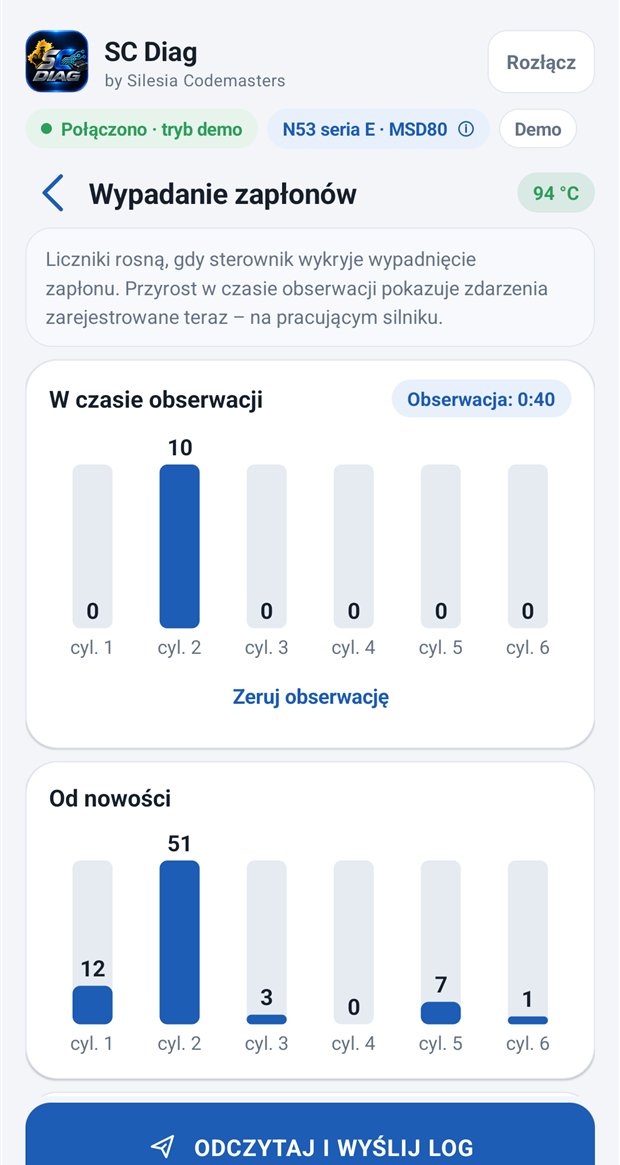
Misfire counters in SC Diag: during the observation and since new. Demo mode, simulated data.
This is a guide to the screens, not an account of a repair. The sequence below is a scenario on demo data. The function itself is described in the article on rough run and misfires. Here the point is how to draw a direction for the checks from the counters and what to base it on.
The short answer: the misfire counters in SC Diag show which cylinder is dropping its ignition: the history since new and the live increase. Together with rough run they point to a cylinder to check. They do not say whether the spark plug, coil, injector or fuel supply is at fault, because different faults give the same picture.
Two sets of bars on one screen
The upper set, “During the observation”, is the increase counted by the app on a running engine from the start of the observation. In the scenario the observation lasts 40 seconds. The lower one, “Since new”, shows how many times the control unit has registered a misfire on each cylinder over the whole life of the engine. The on-screen text says it plainly: the counters rise when the control unit detects a misfire.
The screenshot was taken at 94 °C, so on a warm engine. If the symptom only appeared in the morning, the same screen on a cold engine could show a different increase. That is why we take the reading under the conditions in which the problem appears (rough idle when cold).
Lifetime counters: history, not a verdict
In the scenario cylinder 2 has 51, cylinder 1 has 12, cylinder 5 has 7, cylinder 3 has 3, cylinder 6 has 1 and cylinder 4 has zero. Cylinder 2 leads, but this is a sum over the whole life of the engine. It does not tell you whether the problem exists today or existed three years ago.
Caution is in order here. According to descriptions online, the counters can be misleadingly high after bad roads or on older software, and can point to a cylinder that is not at fault. That is why we do not buy parts on the number alone. When buying a car, though, the history from the counters is valuable background (pre-purchase check).
Live increase and the “Reset observation” button
The upper bars tell you what is happening now. In the scenario cylinder 2 has an increase of 10 in 40 seconds and the rest zero. That is a picture we take seriously, because the problem is present on a running engine and not lying in the archive. A zero increase does not close the matter, though. Repeat the observation under the conditions in which the symptom appears, for example after a night or on a drive with a dynamic log.
“Reset observation” starts measuring the increase from scratch. After replacing a spark plug or coil you use it to check whether the increase has stopped. The Windows program also has a tab with counters since the last clearing, divided by operating mode, where the control unit supplies them. On the N43 and N53 this shows whether misfires happen in homogeneous or stratified mode (operating modes).
Rough run as a second opinion
The counters count events, while rough run shows the unevenness of each cylinder on a graph.
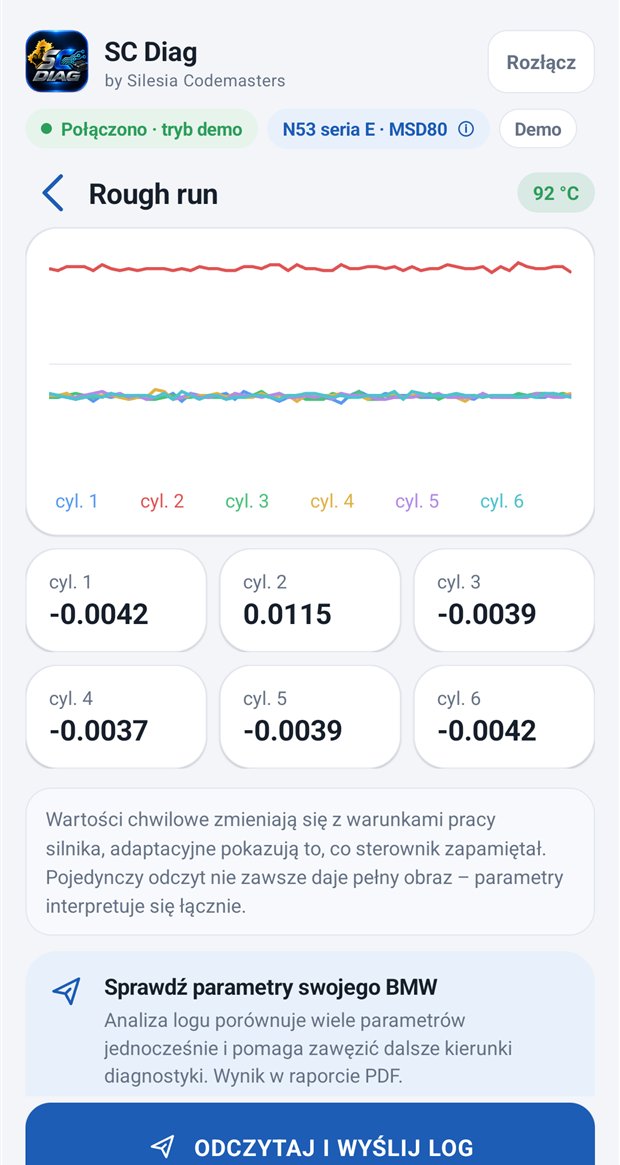
Rough run: cylinder 2 stands out from the rest. Demo mode, simulated data.
In the scenario cylinder 2 lies clearly higher: 0.0115, against −0.0037 to −0.0042 for the others. Two screens pointing at the same cylinder are a stronger lead than one. When the counters rise while the graph is clean, or the other way round, that is information too, for example that the fault only appears when cold. Before trusting the graph, check the status of the flywheel adaptation (how to read the graph).
Ignition, injector or fuel supply: the direction of checks
What follows is an order of checking, not a diagnosis.
- One cylinder, repeatedly, counters and rough run in agreement: first the spark plug and coil, with a swap between cylinders (coils, spark plugs).
- The same cylinder with the ignition in order: the injector corrections and adaptations (N53, N43) and only then compression.
- Several cylinders or all of them, especially when cold: fuel supply and intake. You look at low and high pressure and at the mixture corrections.
- Misfires in one operating mode only: compare the counters divided by mode and check the NOx system, which affects entry into stratified mode (NOx diagnosis).
In the screenshot the low pressure (LPFP) shows 5012 hPa. Our workshop criteria for the N43 and N53 are about 5000 hPa, with each reading within ±100 hPa, depending on the engine and the measuring conditions (fuel pressure).
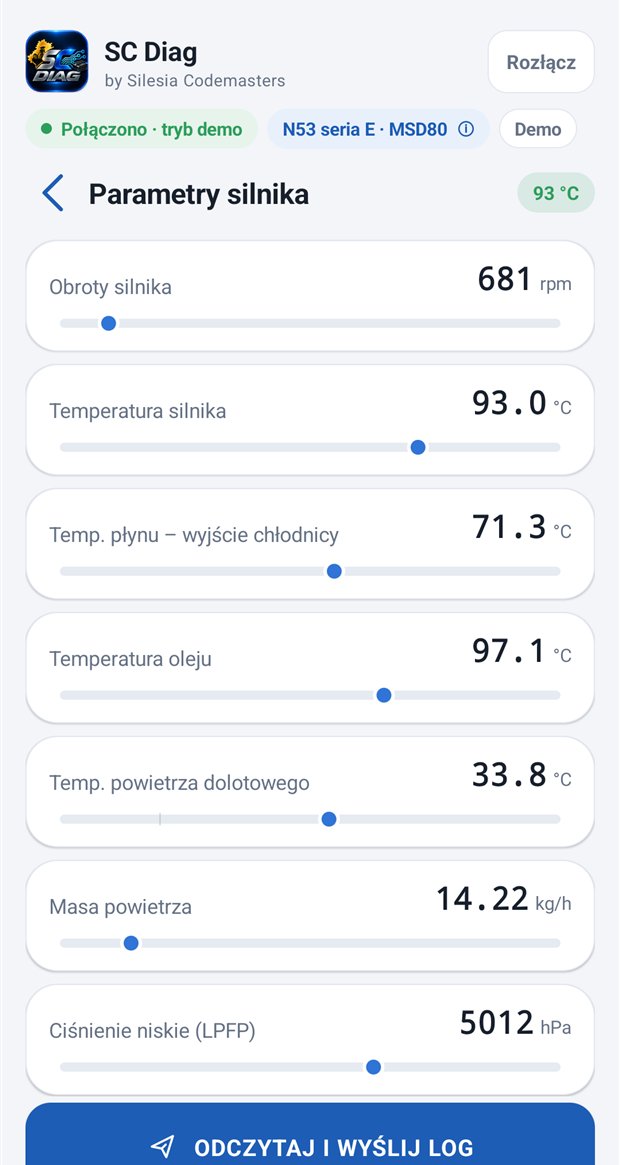
Engine parameters, including the low pressure (LPFP). Demo mode, simulated data.
If the symptom only appears on the move, dynamic logs with live graphs help, including misfires, ignition, injection and rail pressure.
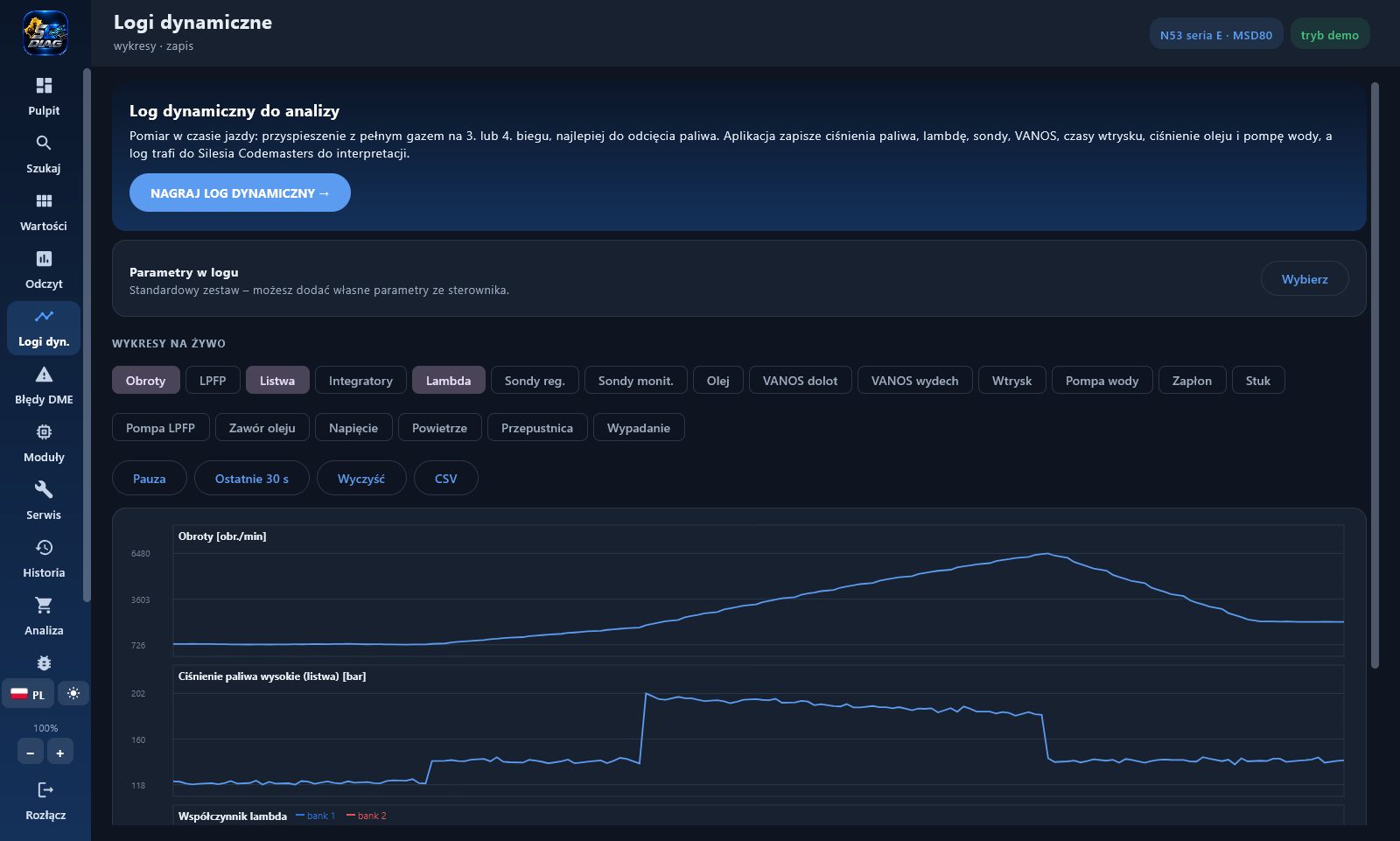
Dynamic logs with live graphs. Demo mode, simulated data.
A flashing engine warning light means misfires, and unburnt fuel reaches the catalytic converter. In that case we do not keep driving on a test run. Which screen to check for other symptoms is collected in the article N43 and N53 symptoms and where to see them in SC Diag.
Read the fault memory without clearing it. The freeze frame shows engine speed, load and temperature at the time of the entry, which often says more than the code itself (how to interpret errors). Also write down the counters before the repair and after it, so you have something to compare with.
How we can help
You can take the reading yourself in SC Diag, on Android or Windows (Windows version). These are separate licences: €9.99 for 30 days, €29.99 for a year, €69.99 for 2 years (with the Service option). The N43 and N53 have the fullest range, and a reading does not replace an inspection in the workshop.
The second path is diagnostics with us (N43, N53): in Silesia, on site or remotely. We agree the scope by phone, 570 341 744. When you order a diagnostic, one-off access to the app is free of charge.
Frequently asked questions
It is the number of misfires registered by the control unit for each cylinder over the whole life of the engine. They show history, not whether the problem exists today, and they can be misleadingly high.
The live increase is counted by the app on a running engine from the start of the observation and shows events from the last moments. The lifetime counters are history stored in the control unit.
Not on its own. It will show the cylinder, and swapping coils, checking the spark plugs, the injector corrections and the fuel pressure establish what lies behind it.
It starts measuring the increase from scratch. After replacing a spark plug or coil you can see whether the cylinder has stopped dropping its ignition.
No. It is demo mode with simulated data, and the sequence described is a scenario, not an account of a repair.
Which cylinder is dropping its ignition?
A reading in SC Diag shows the lifetime counters, the live increase and rough run in one place.
Order SC Diag