The warning light is on, someone plugs in a reader and sees forty entries. The first reflex is to clear everything and see what comes back. That is usually the worst possible move, because together with the entry goes whatever could have said why it happened.
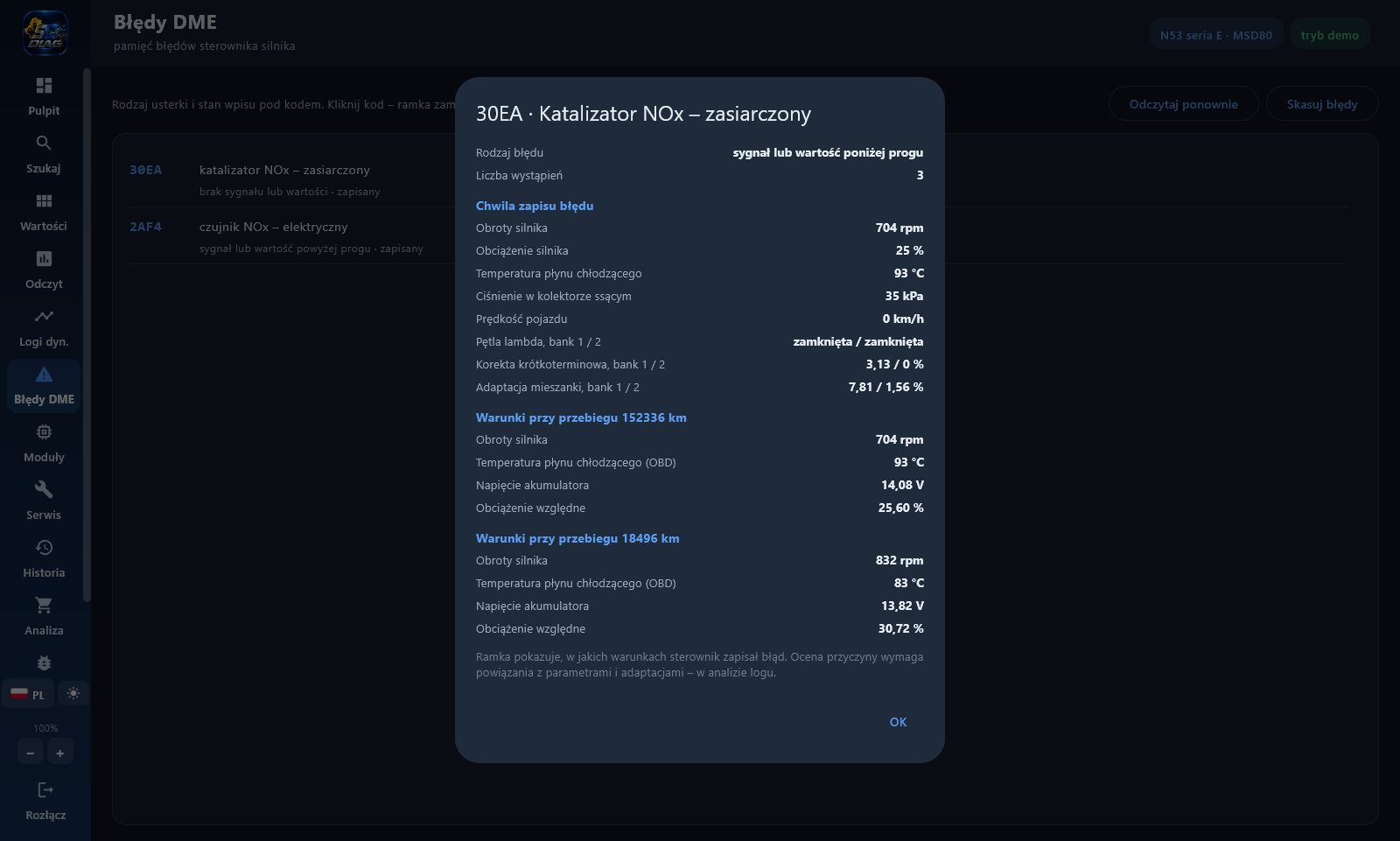
Freeze frame of an entry in SC Diag for Windows. Demo mode, simulated data.
This is not a list of codes, we have a fault code database for that. It shows a method: how to read an entry, in what order to act and when a code is a lead and when only a symptom.
Short answer: first check the power supply and the connection, then save the whole reading together with the status and the freeze frame, and only then look for the cause. A code points to an area, not to a part. Clear faults after the repair, not before it, so that the fault does not return and you do not lose the trail.
Power first, faults second
A flat or unstable battery can flood the memory with entries about supply voltage and lack of communication in several modules at once. So before you treat anything as a fault, check the battery and the voltage during the reading. In SC Diag the voltage is on the dashboard the whole time, and we describe battery condition in the article on the IBS sensor. Then there is the connection: an adapter that keeps dropping gives an incomplete reading and the illusion that something is missing.
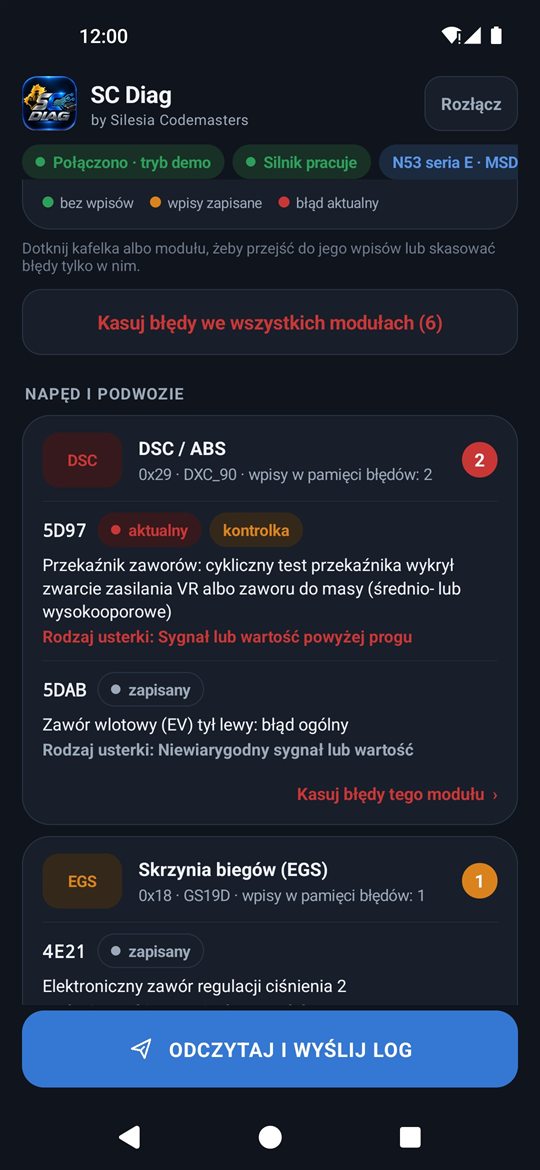
Entries with different statuses in SC Diag on Android. Demo mode, simulated data.
The status of an entry says more than the number
The same code can mean something different depending on its status. In SC Diag an entry has a status: current, stored or warning light. Current means the control unit sees the problem right now. Stored is a trace in memory, and the fault may have gone away since. Warning light ties the entry to the lamp being lit. The exact meaning depends on the control unit, so treat it as a pointer, not a verdict.
Separating “now” from “once” saves a lot of time. Looking for the cause of a fault that is no longer there is a common reason for wasted parts. On the other hand, a current entry with the engine running deserves priority.
The freeze frame: when it happened
A freeze frame is a record of the conditions at the moment of the entry: engine speed, load, coolant temperature, speed, state of lambda control, corrections and, for repeat occurrences, the mileage. It tells you whether the fault appeared on a cold engine at idle or under load on the road. This is often more important than the description of the code itself, because it narrows down the scenario you need to reproduce. The number of occurrences also tells you whether it was a one-off or a repeat.
A code: a lead or a symptom
Some entries point to the cause, some only to the effect. A code for a mixture that is too lean describes an effect: the cause may be an intake leak, an injector or a sensor. A code for lost communication with a module is often the result of a voltage drop, not of a damaged module. Likewise a sensor entry may result from its supply or its connector. That is why we compare an entry with parameters and adaptations, not with the description alone. An example of this logic for the NOx system is in the article on NOx fault codes.
Faults in other modules matter too
A car has a dozen or more control units, and the engine's fault memory is only one of many. In SC Diag the module map shows which of them have entries and lets you open each one. If entries in many modules appeared at the same moment, the common cause usually lies in the power supply, not in each module separately. A single current entry in a module related to the symptom deserves attention, while an old entry from another part of the car often has nothing to do with the problem.
What it looks like in an example
In a demo-mode screenshot, entry 30EA for the NOx catalytic converter has the status stored and a few occurrences. The freeze frame shows a warm engine at idle, and next to it are the conditions at two different mileages. So you can see that the event has been repeating, but the entry alone does not yet say whether the catalytic converter or the sensor is to blame. We described the next steps in the article on code 30EA.
The order in which we work
- Check the battery, the power supply and the stability of the connection.
- Save the whole reading: codes, statuses, numbers of occurrences and freeze frames. Take a screenshot or save a log.
- Separate current entries from stored ones and set aside those that look like a trace of a power supply problem.
- Read the freeze frame of the most important entries and recreate the conditions.
- Compare it with live values, adaptations and the symptom.
- Only then assess the part and carry out the repair.
- Clear the faults, take a test drive and read the memory again.
Why not clear straight away
Clearing repairs nothing. The warning light may go out and the entry returns as soon as the control unit sees the condition again. On top of that you lose the number of occurrences and the freeze frames, which are the data that could have pointed to the cause. In SC Diag, clearing faults in a module or in all modules is a separate action with a confirmation, so it does not happen by accident. Do it only after the repair and check whether the entry came back.
What a reading does, and what it does not settle
SC Diag shows the engine control unit's faults with descriptions in your language and a freeze frame, and the module map shows the fault memory of the other modules in colours: no entries, stored and current. The full DME memory with freeze frames is also saved in the log for analysis. The scope depends on the control unit. A reading narrows down the area and points to the probable direction, but it will not name the damaged part and does not replace an inspection, a measurement on the car or an assessment of the mechanics.
How we can help
The first route is a reading of your own in SC Diag: from €9.99 for 30 days, €29.99 for a year or €69.99 for two years with the Service tab. Android and Windows are separate licences. You can order it on the SC Diag order page.
The second is diagnostics with us, at the workshop, mobile or remote (N43, N53). We agree the scope by phone, 570 341 744, and you can also send a full reading for log analysis.
Frequently asked questions
Technically yes, but you lose the number of occurrences and the freeze frame. It is better to save the reading first and clear only after the repair.
That the control unit recorded the entry earlier and does not see the problem at the time of the reading. The fault may have gone away or it may occur only occasionally, so check the freeze frame and the number of occurrences.
Clearing removes the entry, not the cause. If the condition is still there, the control unit will record the code again.
Not from the light alone. You need to check which entry triggered it, what its status is and in what conditions it arose.
Usually not. A code points to an area, and the decision about a part comes after comparing it with parameters, the symptom and an inspection.
Read your BMW's faults in SC Diag
Statuses, freeze frames and the module map in one place. From €9.99 for 30 days.
Order SC Diag