A low rail pressure code, the car jerks under throttle and the first thought is always the same: the high-pressure pump. On the N53 that is a natural thought, and far too often it turns out to be an expensive shortcut. This article shows what the SC Diag screens can tell you about the pump, and what you will not read from them.
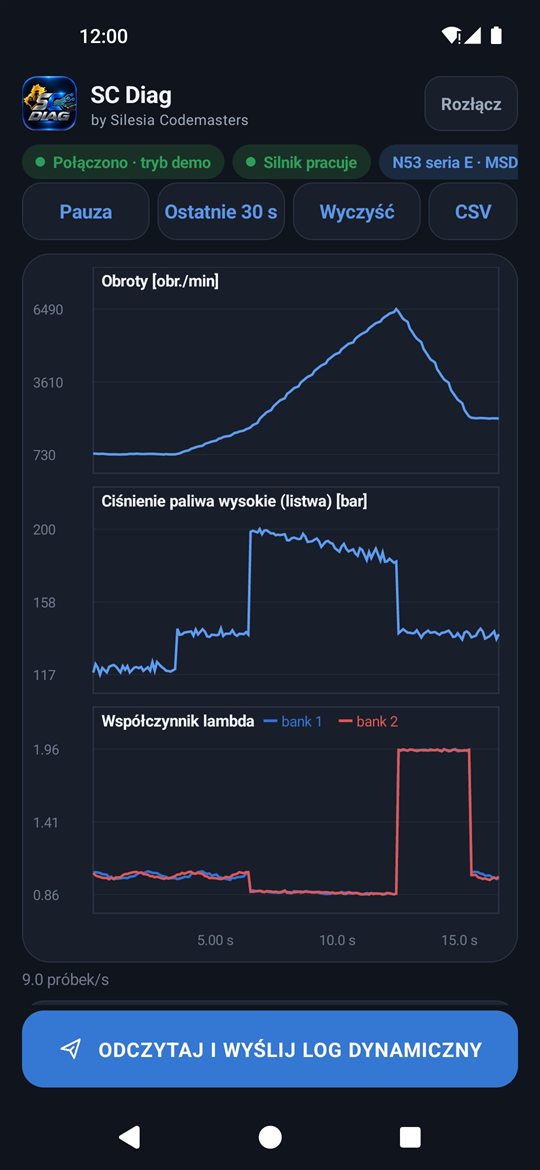
Dynamic log in SC Diag on Android. Demo mode, simulated data, the shape of the curves is not a benchmark.
We will go through an example. It is a scenario, not an account of a real repair: an N53 that jerks when you accelerate harder, with an entry about low rail pressure. The screenshots come from demo mode and use simulated data, so the numbers on them prove nothing. What matters is the layout of the screens and the order of the questions.
The short answer: the N53's high-pressure pump is judged by how rail pressure behaves under load, not by a single reading at standstill. In SC Diag you see it on the drive chart, next to engine speed. Low pressure and the injectors have to be ruled out first. The reading points to a direction for the checks and does not pass a verdict on the pump.
Where the reading starts
After connecting, the app asks when the problem occurs: on a cold engine, on a warm one, always, or "just checking". The answer decides how it guides the reading and what goes into the log. In our example, assume "on a warm engine".
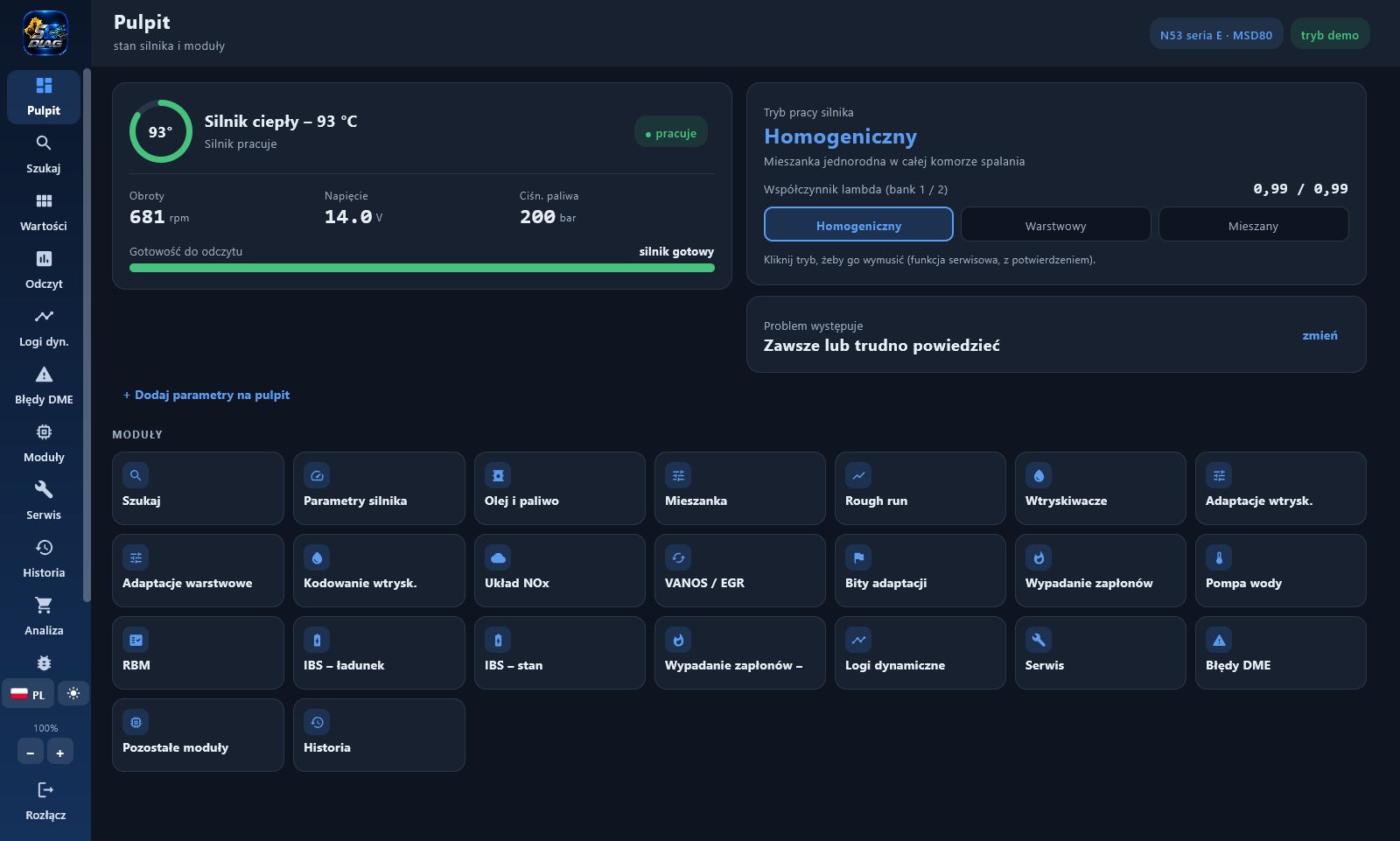
SC Diag dashboard on Windows. Demo mode, simulated data.
Next you see the dashboard: engine temperature, speed, voltage, the "Fuel pressure" tile and a bar showing readiness for reading. In the demo the tile gives a value in bar, while the low pressure on the Engine parameters screen is in hPa, so the units alone tell you which circuit you are looking at. On your own car, check the same thing before you interpret anything.
Step one: the fault memory entry
In DME faults you open an entry. The freeze frame shows the conditions in which the control unit stored it: engine speed, load, coolant temperature, manifold pressure, road speed and the state of lambda control.
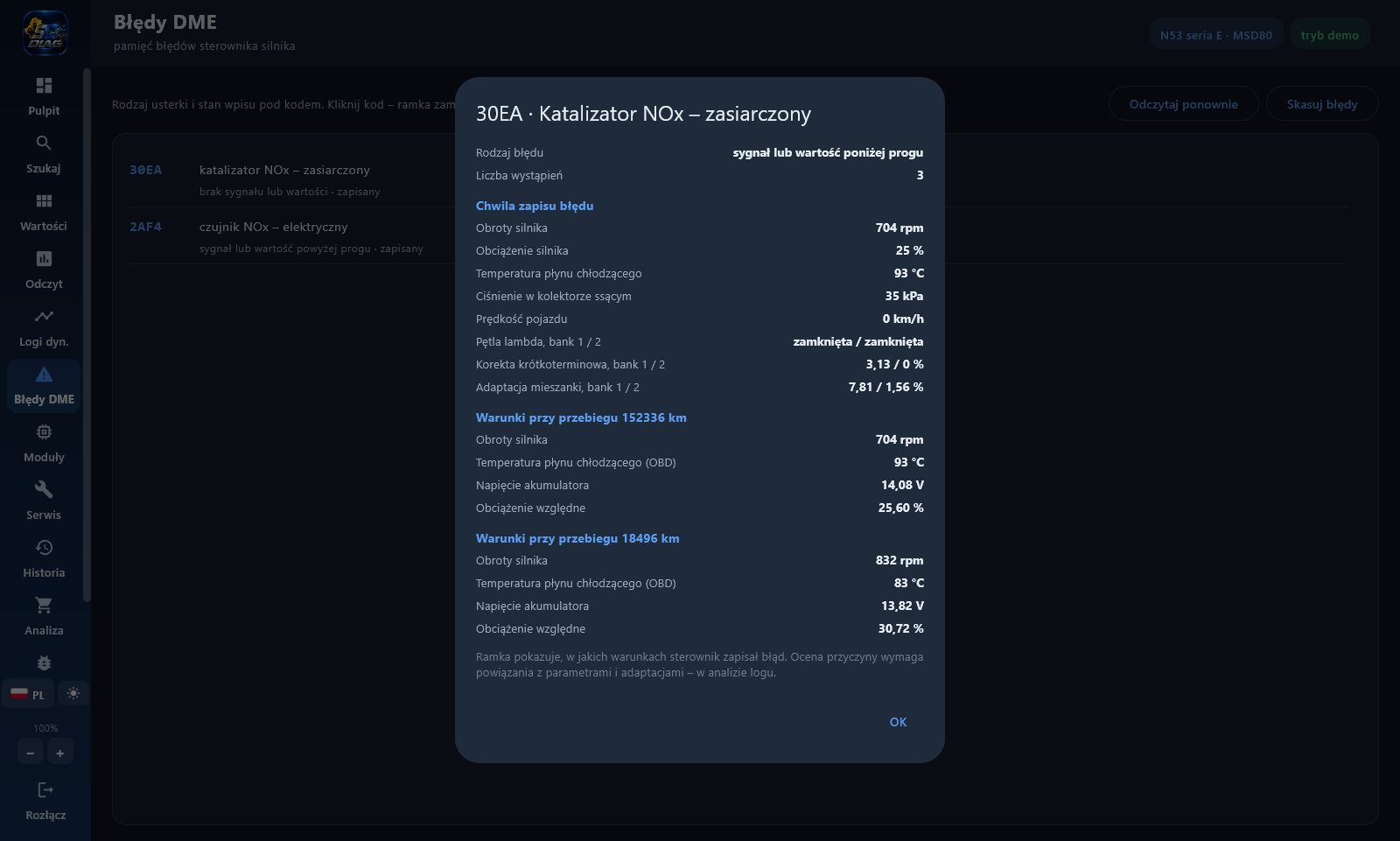
Freeze frame of a fault entry. This is a demo entry about the NOx catalytic converter, used only to show the layout of the screen. Demo mode, simulated data.
If a real entry about pressure was stored at high engine speed and high load rather than at idle, that is the first clue: the trouble appears under load. We do not clear faults before the measurements are finished, because the freeze frame disappears with the entry. We write about reading entries in the article on interpreting fault codes.
Step two: low pressure, before you go any further
The pump on the engine is fed with fuel by the pump in the tank. When that supply is unstable, the high-pressure pump has nothing to build pressure from, and any further conclusions make no sense. That is why on the Engine parameters screen we read the low pressure (LPFP) first.
In our workshop criteria for the N43 and N53 it is about 5000 hPa, every reading within ±100 hPa, and we ignore the first seconds after a cold start. It is our own criterion, depending on the engine and the measuring conditions, not a manufacturer's value. We describe it in more detail in the articles on fuel pressure on the N43 and N53 and on the low-pressure pump in SC Diag.
Step three: the rail on a chart from a drive
At idle the pump has it easiest, so standing still settles nothing. In Dynamic logs you switch on the Engine speed and Rail charts, plus Lambda and LPFP if needed, and go for a test drive. The screen describes it itself: acceleration at full throttle in 3rd or 4th gear, preferably up to fuel cut-off. Do it only where it is legal and safe.
The chart shows rail pressure over time, below engine speed. In the demo screenshot the pressure changes together with engine speed, but that curve is simulated and is not a benchmark for a pump. In your own log you ask one thing: does the pressure keep up as engine speed and load rise, and does it collapse at the same points on every run?
The app shows the requested value only where the control unit supplies it, so it will not always sit next to the actual one. In that case you compare several runs with each other. The record goes to a CSV file or into the log that is sent for analysis.
Step four: does one cylinder stand out
If the pressure collapses under throttle, we check whether one cylinder is running worse at the same time. Rough run draws all the cylinders on one chart, and Misfires shows the counters since new and the increase during the observation.
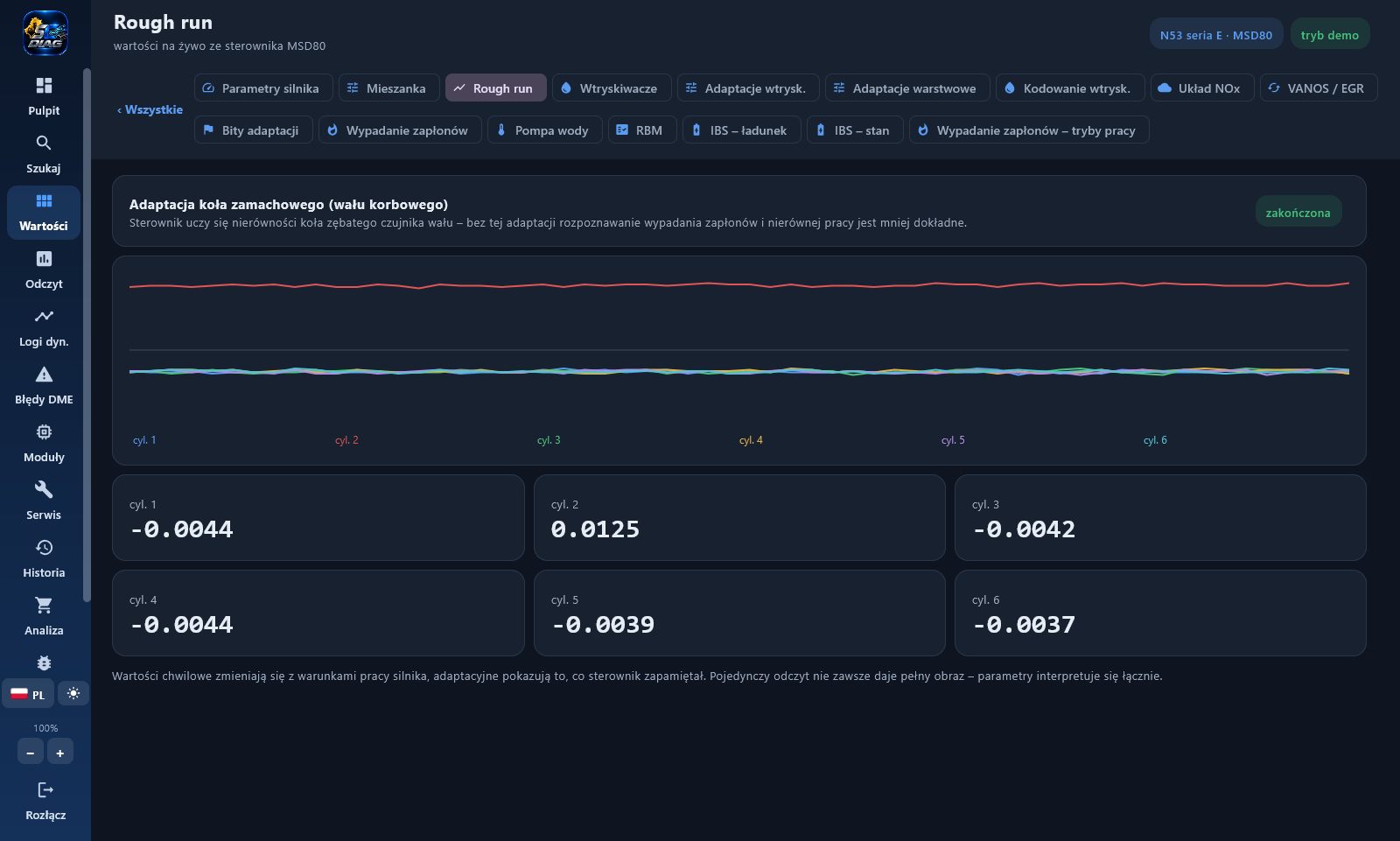
Rough run in demo data: cylinder 2 stands out from the rest. Demo mode, simulated data.
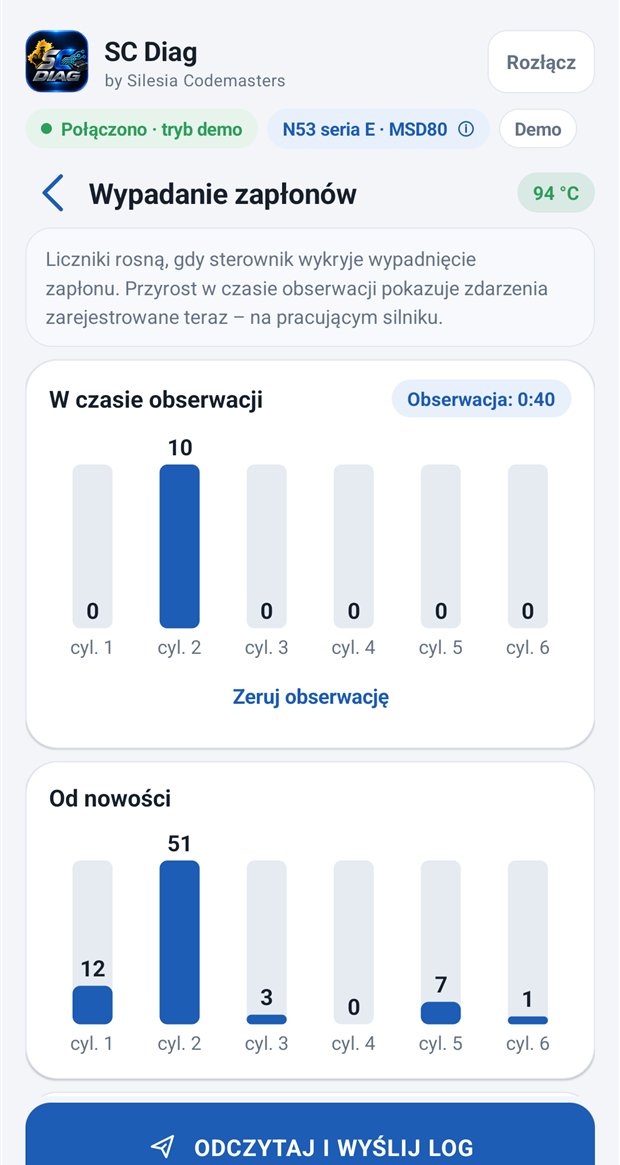
Misfire counters in demo data: cylinder 2 has the most, both during the observation and since new. Demo mode, simulated data.
In the demo data cylinder 2 stands out, on the chart and in the counters. With a pattern like that, suspicion grows towards the injector of that cylinder rather than the pump. When all the cylinders are even and the pressure does not keep up, suspicion returns to the supply and the pump. More in the articles on rough run and on piezo injectors.
What these screens will not settle
Actual pressure is a sensor reading, not a gauge measurement. A faulty sensor will show a number that looks credible, because the control unit regulates to whatever the sensor tells it. The same trace comes from a leaking injector, a clogged filter, the pump's supply and the pump itself. A pressure drop after the engine is switched off more often points to a leak on the high-pressure side, but a drive chart will not show that.
On the N53 some of the symptoms blamed on the pump also come from the crankcase ventilation. That is why replacing the pump as a trial is often a mistake, and we write about the pump itself in the article on the HPFP and LPFP.
What next
When the low pressure is stable, the cylinders are even and the rail pressure does not keep up under load over several runs, the trail leads to the high-pressure pump and its valve. That is not yet a decision to replace it. It is worth having several logs in similar conditions and a description of the symptom, and sending them for log analysis. The whole N53 system is put in order by the N53 diagnostic guide.
How we can help
You can take the first step yourself. SC Diag runs on Android and on Windows (separate licences): from €9.99 for 30 days, €29.99 for a year, €69.99 for 2 years with the Service option. Demo mode shows these screens without a car. The scope depends on the data the control unit supplies, and the N43 and N53 are covered most fully (app features, SC Diag for Windows).
The second path is N53 diagnostics with us, in the workshop in Silesia, on site or remotely. We agree the scope by phone: 570 341 744.
Frequently asked questions
By comparing rail pressure with engine speed in a log from a drive under load, after first checking the low pressure and the cylinders. A single reading at standstill is rarely enough.
It shows the pressure trace, the fault entries with their freeze frames and how the cylinders run, which narrow down the checks. It does not pass a verdict on the pump, because the same picture comes from an injector, a filter, the supply and the sensor.
The high-pressure pump is fed from the low-pressure circuit. If that circuit is unstable, the pump on the engine cannot be judged.
We do not give a single figure. It depends on the engine, temperature and load, and what counts is whether the pressure keeps up when demand rises.
Yes. SC Diag runs on Android with an ELM327 adapter or a cable, and on Windows with a K+DCAN or ENET cable or an ELM327. For E-series cars a K+DCAN cable is best.
Start with a reading under load
In SC Diag you will see rail pressure in a drive log before you buy a pump. We agree the scope of diagnostics at our workshop by phone.
Order SC Diag