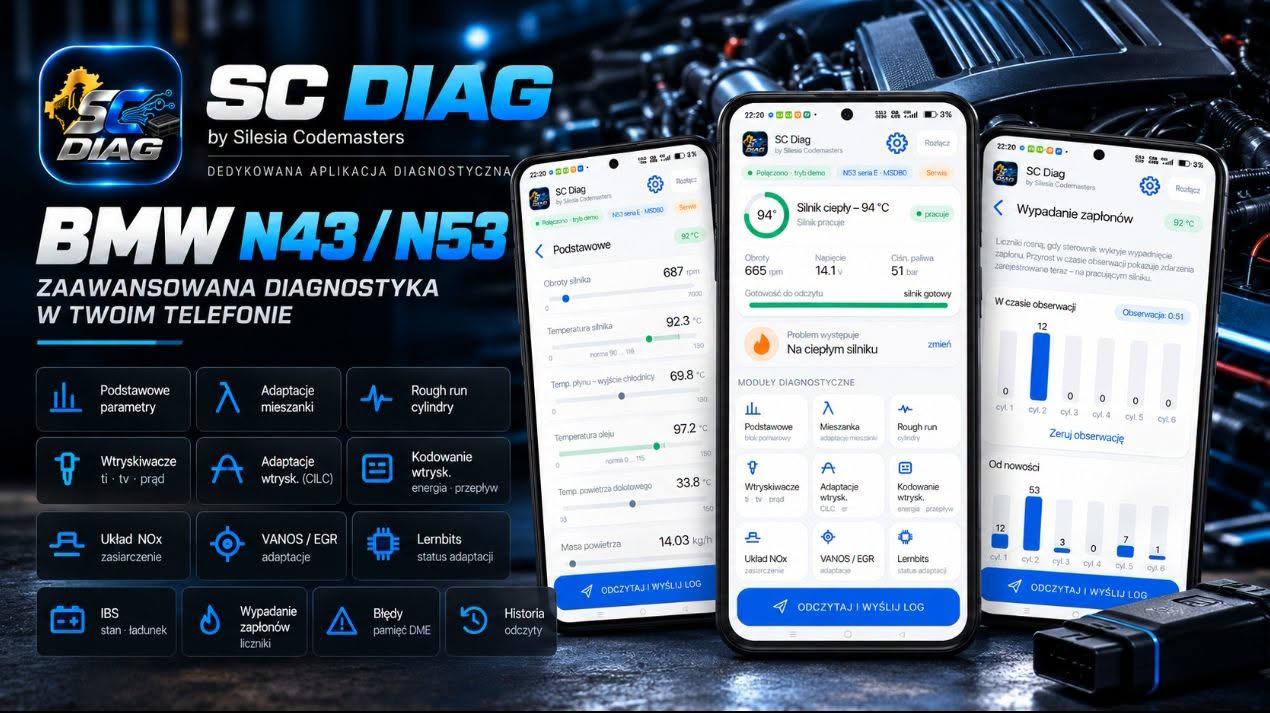
Most fully developed for the two engines that drive owners mad.
The N43 and N53 were the first BMWs with direct petrol injection — with all of its typical troubles: piezo injectors, a high-pressure pump, the NOx system, VANOS and a misfire that fault codes never show. A generic scanner will give you “error P0300”. SC Diag shows you which cylinder and why.
Many engines, specialisation N43 and N53
The app supports 97 BMW and MINI engine control units — the same as the SC Diag program for Windows. The N43 and N53, the engines our workshop built its reputation on, have the fullest scope of assessments, parameter names and presentation. List of control units · SC Diag for Windows
Reading by symptom
Cold engine, warm engine, “I don't know when” or a pre-purchase check — the app runs the reading differently and the log reaches the analysis with the right context.
Specialists on the other side
An encrypted log to Silesia Codemasters with one button and a PDF report with the diagnosis and a repair plan — from people who take these engines apart every day.
This is not just another fault code reader.
A generic OBD scanner reads a dozen general values and P0xxx codes. SC Diag talks to the engine control unit in its own protocol (e.g. MSD80/MSD81 in the N43 and N53, MSD87 in the F-series N53) and reads its diagnostic data — on your phone, in your language, in a single reading. In the N43 and N53 that is over 200 values in one log, counted separately for each bank and each cylinder.
Mixture and adaptations each bank separately
- lambda control integrator (short-term correction)
- additive and multiplicative adaptation — separately at idle, low and high load
- lambda and sensor voltage before and after the catalyst
- sensor resistance (ageing and heater efficiency) and heater PWM duty
- lambda adaptation learning status and cylinder balancing at the end of the range
Injectors each cylinder separately
- injection time and drive duty cycle
- electrical charge and voltage of the piezo injector
- CILC correction: current and “warm” adaptations in the low and high range
- ER adaptation (stratified operation at idle)
- injector coding stored in the control unit
Fuel and oil
- low pressure (LPFP pump) and high-pressure rail pressure
- fuel pump control
- oil pressure: target, actual and control valve duty cycle
- oil, coolant, intake air and radiator outlet temperature
- HFM air mass, load, ambient pressure
VANOS and EGR
- intake and exhaust camshaft: target versus measured angle
- VANOS adaptations of both camshafts
- EGR: sensor voltage, valve lift, stop adaptations and learning status
- a series of readings over time to see whether the camshaft follows the target value
NOx and catalyst
- NOx concentration and linear lambda from the NOx sensor
- binary sensor signal and exhaust gas temperature
- NOx catalyst sulphur loading (accumulated sulphur mass)
- catalyst loading mode and cut-off during engine braking
Ignition and running smoothness
- rough run: a 30-second series for each cylinder, with engine speed at every measurement
- misfire counters since new — cylinder by cylinder
- live misfire increase during the reading
- counters since the last reset, split by engine operating mode (where the control unit provides them)
DME fault memory
- current, informational and historical faults with the mileage at which they occurred
- freeze frames: engine speed, load, manifold pressure, coolant temperature and lambda control state at the moment of the fault
- frequency of occurrence and status of every code
- descriptions in plain language, no translator needed
Battery and IBS
- state of charge (SOC), including the 5-day average
- starting capability and battery state of health (SOH)
- charge and mileage recorded by the IBS sensor
- estimate of the real battery capacity
- battery voltage during the reading
The whole car, not just the engine
- an overview of up to 66 control units in the E-series with one tap
- fault codes of every module with description and status
- information on which modules respond and which do not
- clearing faults in modules, with confirmation
The scope of the readings depends on the engine, the control unit and the software version of the car. BMW is a trademark of BMW AG and Silesia Codemasters is not affiliated with BMW AG.
Real screens. Real features.
Below is the current version of the app; the screens come from the demo mode (simulated data — the numbers in the screenshots do not come from a real car).
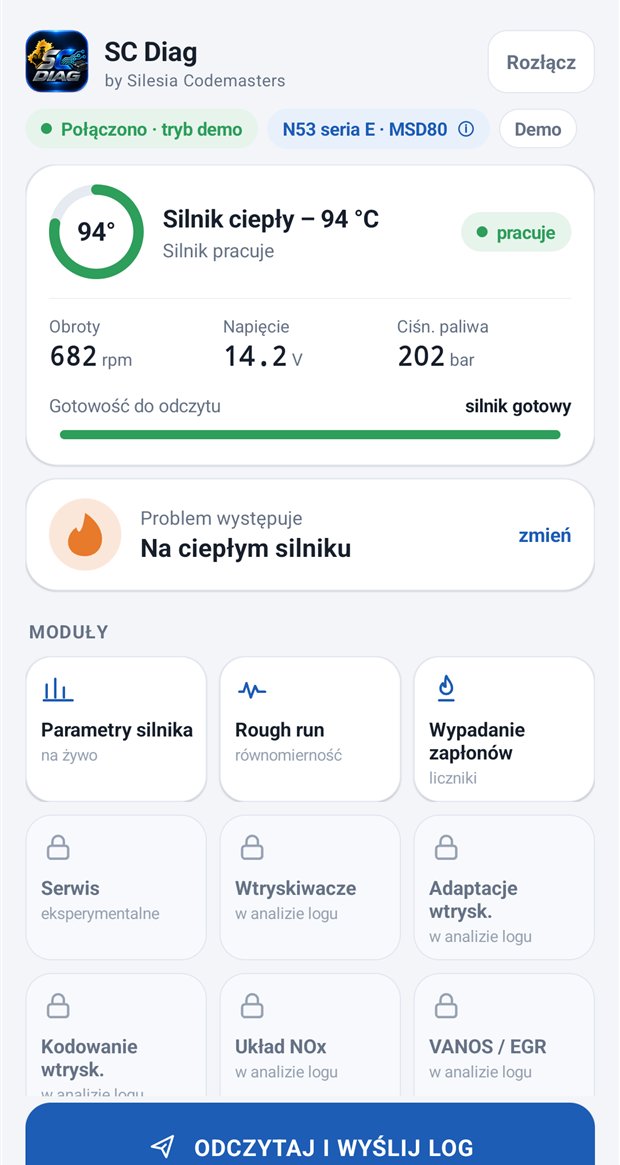
You know the engine is ready — before you start.
One glance: engine temperature in the ring, speed, voltage, fuel pressure and the readiness for reading bar. The module tiles are below, and at the bottom there is always the same large button: Read and send log.
- After connecting, the app recognises the engine and the control unit (MSD80, MSD87).
- During a full reading it makes sure the engine is running — with clear messages: start the engine, don't touch the throttle.
- Light and dark mode, digits that stay readable even in sunlight.
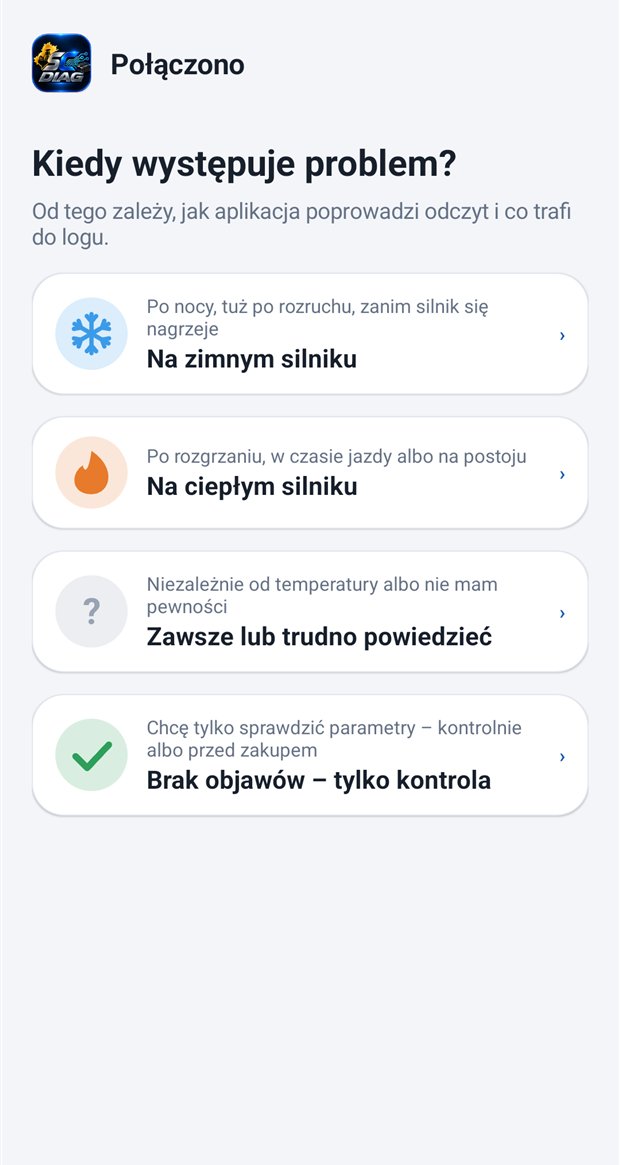
“When does the problem occur?” — that is where diagnosis starts.
Does it jerk after a cold night? Only when warm? Or do you simply want to check a car before buying it? The app asks about the symptom and adapts the whole reading — exactly the way we do it in the workshop.
- On a cold engine — a step-by-step reading from the cold start.
- On a warm engine — after warming up, while driving or at standstill.
- Always or hard to say — a full, neutral reading.
- No symptoms — check only — ideal before buying a car.
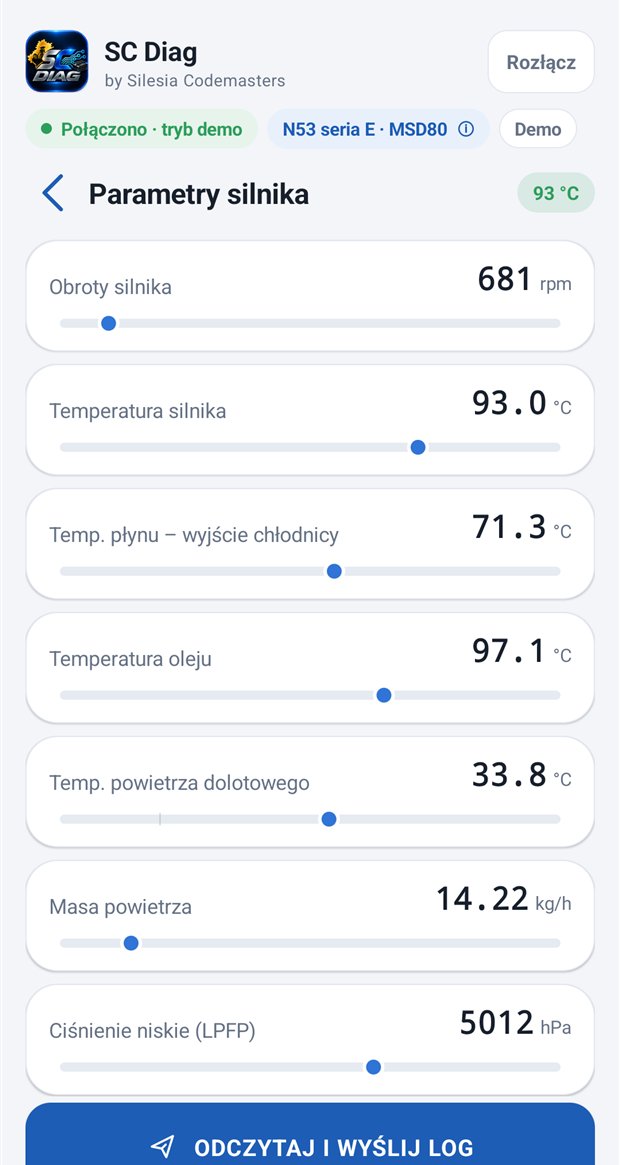
Live parameters — readable and with a range.
Engine speed, temperatures (engine, coolant, oil, intake air), air mass, low fuel pressure and more values — with a slider showing where the reading sits. Instead of German abbreviations: names you can actually read.
- A clear list instead of hundreds of entries with no description.
- Values refresh live, also when the engine speed changes.
- The same parameters go into the log analysed by specialists.
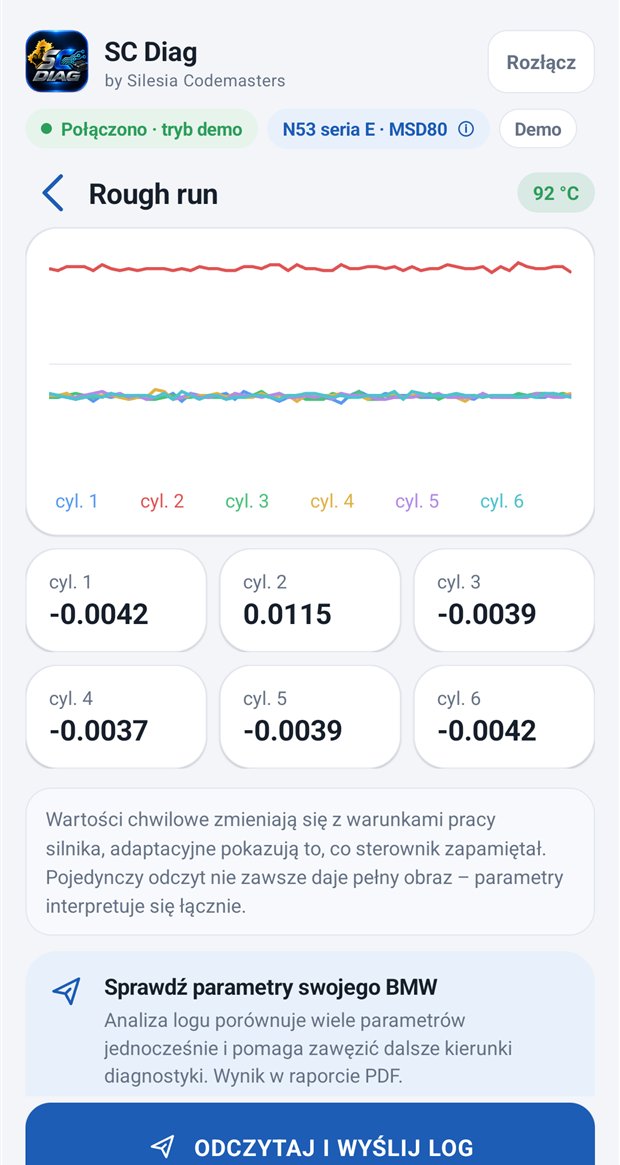
Which cylinder is jerking? You will see it on the chart.
Rough run is the fastest way to see whether the engine runs smoothly. SC Diag draws it for all cylinders at once and shows the current value for each. A cylinder that stands out is visible immediately — and is often the first lead to an injector, ignition or compression.
- Live chart with a colour assigned to each cylinder.
- The full rough run series also goes into the log and is evaluated in the analysis (N43 and N53 limits separately).
- The note below the chart reminds you that the result is interpreted together with other parameters.
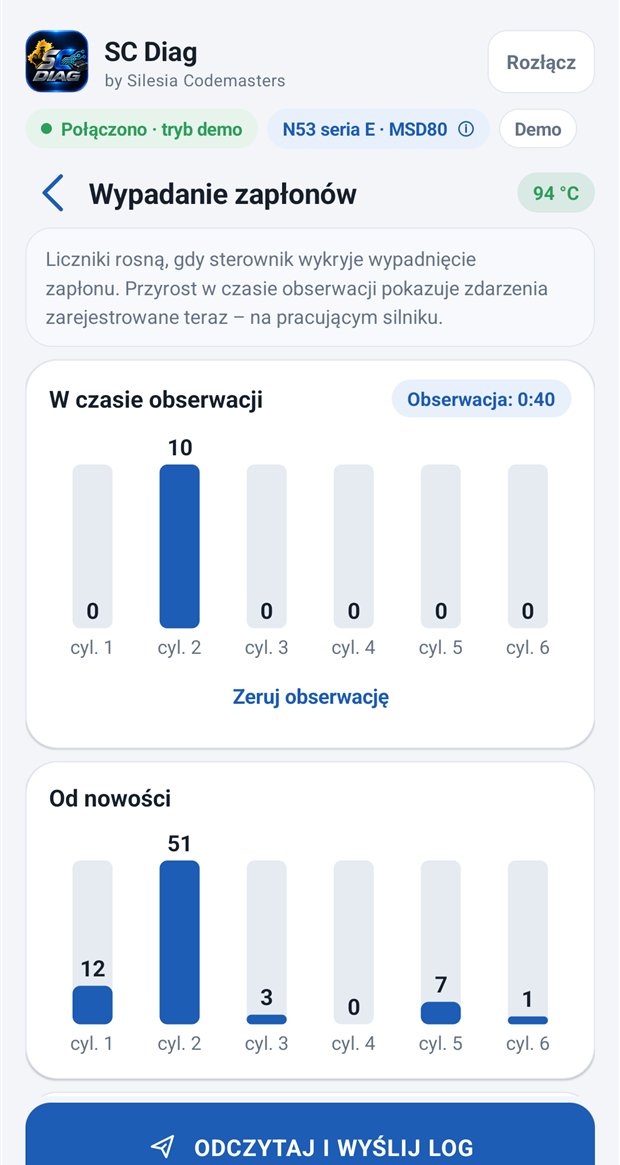
Misfire counters: the engine's whole life and what is happening now.
Two views on one screen. Since new — how many times the control unit has registered a misfire on each cylinder over the whole life of the engine. During observation — the increase counted by the app while the engine runs, so you see at once whether the problem is happening right now.
- One look at the bars is enough to pick out the “sick” cylinder.
- The “Reset observation” button lets you check the change after replacing a spark plug or a coil.
- The counters go into the log — the specialist sees which cylinder had trouble most often.
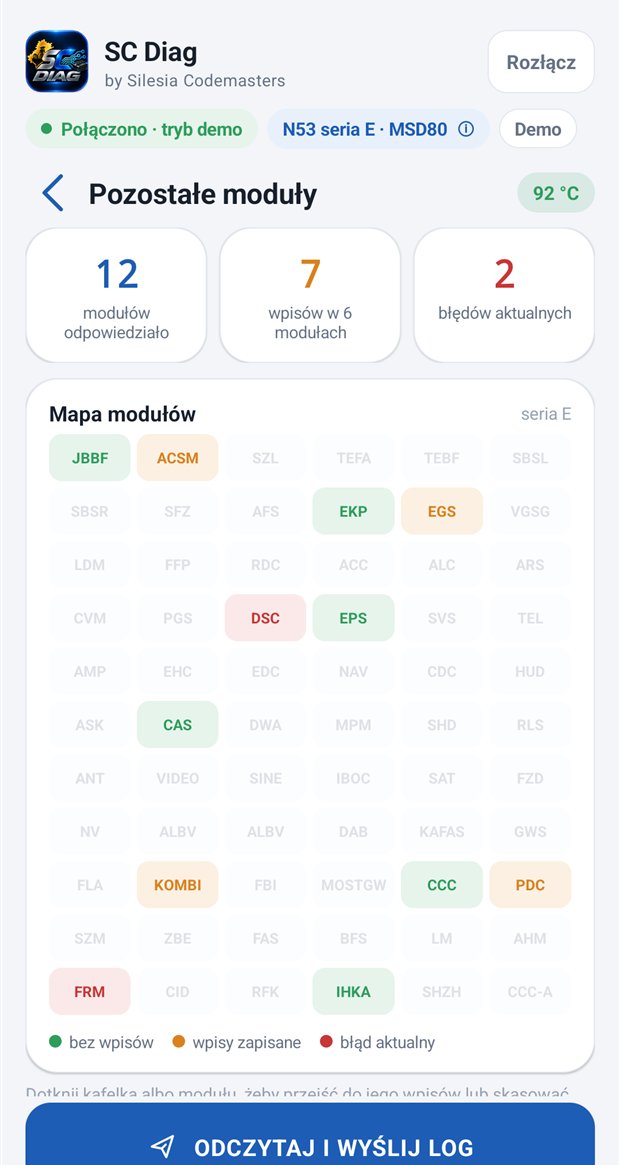
An overview of control units across the whole car — not just the engine.
One tap and the app queries the other control units in the car (in the E-series — 66 addresses). The result is a module map: green with no entries, orange with stored faults, red with a current fault. Tap a tile and you immediately see the codes with a description.
- A counter of responding modules, entries and current faults on one screen.
- Clearing faults in one module or in all of them — always with confirmation.
- Modules grouped by topic (e.g. drivetrain and chassis), with the most urgent entries at the top.
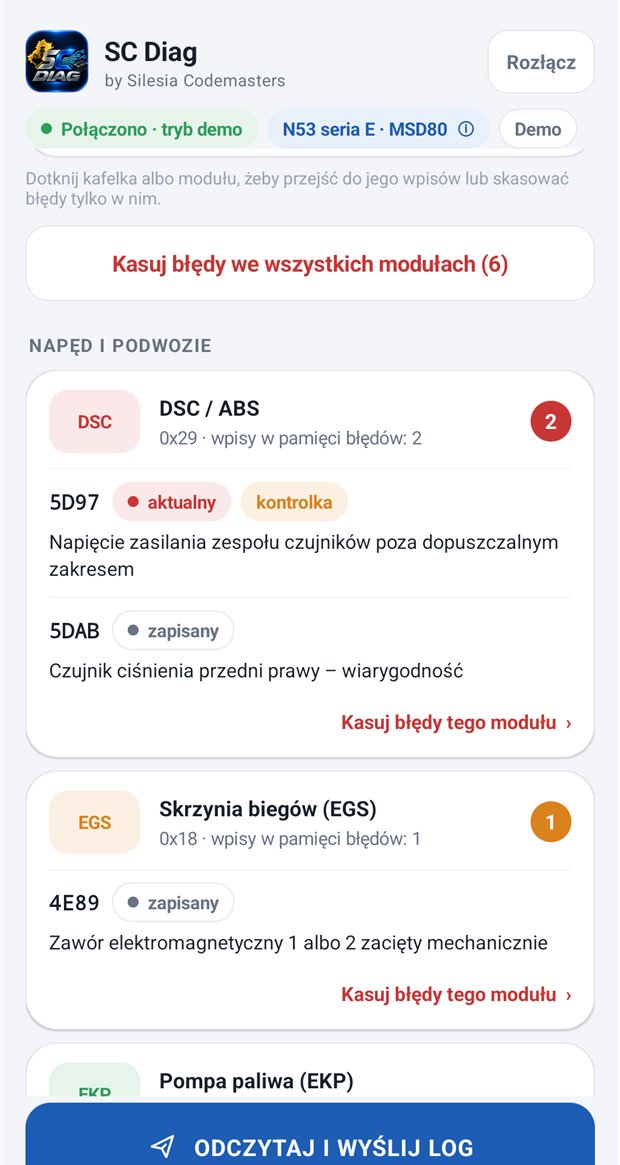
Code, status, description — no translator and no dictionary.
Every entry shows the code, the status (current, stored, warning light) and a description, e.g. “Supply voltage of the sensor cluster outside the permitted range”. That tells you at once whether you are looking for a real fault or just the trace of a discharged battery.
- Descriptions you can understand without a dictionary — no German abbreviations.
- Sorted by what is current — the most serious entries at the top.
- The full DME fault memory with freeze frames is saved in the log for analysis.
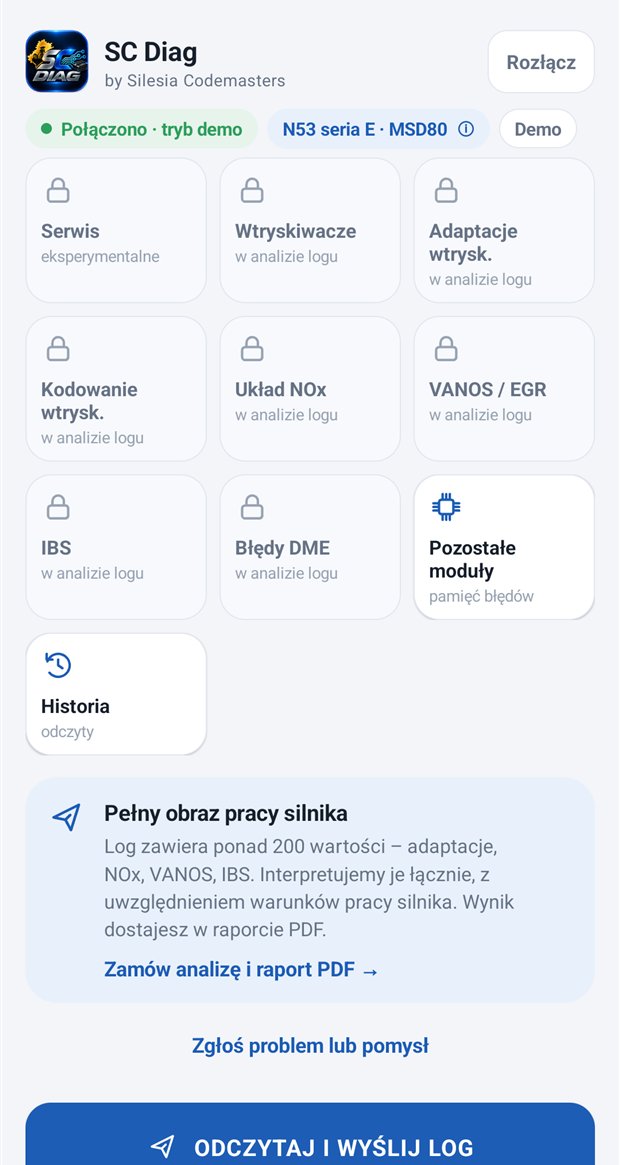
Over 200 values in one log — and a report that tells you what to do.
The key data is collected by Read and send log: mixture and small-quantity adaptations, injectors (times, corrections, coding), the NOx system, VANOS and EGR, IBS and battery state, fault memory, misfire counters and the rough run series. Tiles with a padlock are data that we assess in the log analysis, because a single number without context says nothing.
- The log is encrypted in the app — you decide whether to send it.
- The specialist's analysis combines all parameters with the engine's operating conditions.
- PDF report: the diagnosis, the most likely cause and a repair plan.
- Order an analysis straight from the app — no retyping of data.
Developed almost every day.
Over 40 releases in under two weeks. Every fix comes from real readings from cars and from customer reports. Recently we added:
Engine operating mode
The dashboard shows whether the engine runs on a homogeneous, stratified or mixed mixture, together with the lambda of both banks.
Battery state from IBS
An estimate of battery capacity and condition in the E- and F-series — and when it cannot be calculated reliably, the app tells you why.
DME faults in your language
1338 engine control unit fault descriptions in English and French, plus freeze frames with the conditions in which the fault was stored.
Service procedures in your phone.
Holders of the 2-year licence with the service option (and of existing lifetime licences) get the Service tab — procedures that used to require a laptop and a cable at the car, to the extent supported by the app version and the control unit. Examples:
Injector coding
E- and F-series. After replacing an injector you enter the codes from its body. The app first backs up the current coding, writes only the changed cylinders and checks the write with a verification read. You restore the backup with one button.
NOx catalyst desulphation
At standstill — with a progress bar, procedure phases, catalyst and exhaust temperature and the lambda of both banks live; while driving — with a view of the state and the sulphur loading. You can stop it at any time.
Battery registration
After replacing it with a battery of the same capacity and type. The state of the IBS sensor is saved before and after registration — you see what the control unit changed.
Experimental functions. Before first use the app shows a warning and asks you to confirm that you know the risk; every procedure needs separate consent. Changing the battery capacity or type (coding) is not available. With the 30-day and 12-month licences the tab is visible but locked. We extend the procedures in later versions (no commitment to specific functions).
Details that make a difference every day.
Diagnosis without a licence
No key? Take a reading for analysis on a warm or cold engine, send the log and receive a PDF report. You only need a key for the live view.
Adapter or cable
ELM327 over Bluetooth or Wi-Fi and a K+DCAN USB cable (E-series). Support for the ENET cable for the F-series has been added and is still being tested.
Four languages
Polish, English, German and French — you choose the language in the app or leave it on automatic, following your phone. Ideal for customers outside Poland.
In-app updates
The app checks for a new version itself, downloads it, verifies the checksum and the signature and installs it after your confirmation. Your licence and history stay.
Reading history
All readings stay on your phone — you can return to them, compare them and delete them at any time.
Report a problem or an idea
Something doesn't work or a feature is missing? You report it from the app on a single screen — with attached screenshots (up to five), without leaving the app.
SC Diag, a generic OBD app and workshop software on a laptop.
Each of these tools has its place. Here is how they differ when diagnosing the N43 and N53.
| SC Diag | Generic OBD app | Workshop software on a laptop | |
|---|---|---|---|
| Hardware | phone + ELM327 adapter or K+DCAN cable | phone + ELM327 adapter | Windows laptop + cable |
| Installation and setup | you download the app and connect | you download the app | installing and configuring workshop programs |
| Interface and parameter names | in Polish, English, German and French | usually generic OBD names | often German abbreviations |
| N43/N53-specific data | yes — tailored to these engines | usually only general parameters | yes |
| Rough run and misfire counters | a live chart and counters for each cylinder | usually none | yes, on separate screens |
| Overview of all control units | a module map with descriptions | usually the engine only | depends on the program |
| Specialist analysis and report | PDF report with a repair plan | none | up to you |
The comparison is general; individual products differ in what they can do. We are not affiliated with BMW, and SC Diag is our independent app.
From download to report — four steps.
Download and install
You download the APK file from our website. Android will ask for permission to install from this source — that is normal for apps from outside the Play Store. Step-by-step instructions.
Plug in the adapter and choose the symptom
Plug the adapter into the OBD socket, switch the ignition on, connect to it and tell the app when the problem occurs.
Take the reading
The app guides you through the whole reading and shows the live status. All you need is a running engine and your foot off the throttle.
Send the log and receive the report
One tap — the log goes to Silesia Codemasters. You receive a PDF report with the diagnosis and a repair plan.
One app, several uses.
N43 and N53 owners
Check what is really happening with the engine before you spend thousands replacing parts “blindly”.
Car buyers
The “check only” option — a quick reading before purchase and a report instead of guessing.
Independent workshops
Read and review control units without a laptop at the car, and send the hard cases for analysis.
Customers from all over Europe
An app in four languages and remote analysis — wherever the car is.
Access from €9.99. All functions in every paid licence.
The licence is tied to one phone; the licence for SC Diag for Windows is separate, at the same prices. Every paid licence includes all app functions; the Service tab is only in the 2-year licence (and in existing lifetime licences, which keep working unchanged). Access covers reading and sending the log; the analysis and report are a separate diagnostic service (basic €50, or €40 with the 2-year licence or an existing lifetime licence). Details, ordering and prices on the app page.
Frequently asked questions.
It shows live BMW engine parameters (most fully for the N43 and N53), draws rough run for each cylinder, counts misfires (since new and during observation), reviews the control units across the whole car and shows their faults with descriptions, and during a full reading it saves an encrypted log with over 200 values for analysis and a PDF report. The 2-year licence with the service option adds the Service tab (experimental procedures; we extend them in later versions, with no commitment to specific functions).
For everyday reading — parameters, rough run, misfire counters, fault review — yes, and without a laptop. But it is an independent Silesia Codemasters app, not manufacturer software: it is not meant for full coding or programming of control units. For hard cases we add the support of specialists.
BMW and MINI engines — 97 engine control units, petrol and diesel, the same as in the SC Diag program for Windows: including N13–N74, N47/N57, M47/M57/M67, B37/B47/B57, B38/B48/B58, S55, S58, S63, S68, MINI and i3. N43 and N53 have the fullest scope of assessments and descriptions; for other engines the scope depends on the data provided by the control unit. After connecting the app recognises the engine and the control unit. The review of the other modules shows control units from across the car; their number and names depend on the series and equipment. Full list of engine control units.
An Android phone (8.0 or newer), an ELM327 adapter (Bluetooth or Wi-Fi) or a K+DCAN USB cable, and a BMW or MINI with an engine control unit from the supported list. The cheapest ELM327 clones can be unstable — it is worth buying an adapter from a reputable maker; we are happy to advise.
Yes — you can take a reading for analysis without a key (on a warm or cold engine), send the log and receive a PDF report. The live view of parameters and modules requires a licence. You can also look at the app in demo mode.
Reading data does not change anything in the control unit's settings. Changes happen only when you start them yourself: clearing faults (after confirmation) or the Service tab procedures (2-year licence and existing lifetime licences), which have separate warnings and need your consent.
Generic OBD apps show general parameters and codes. SC Diag talks to the engine control unit in its own protocol: a rough run chart for the cylinders, misfire counters, adaptations and parameters specific to the given engine (most fully for the N43 and N53), and a full log for specialist analysis.
The log is encrypted in the app and you decide whether to send it. Reading history is stored on your phone and you can delete it at any time. Every version of the app is signed with the publisher's key, and the downloaded file is checked with a SHA-256 sum.
30 days: €9.99, 12 months: €29.99, 2 years with the service option: €69.99 (with the Service tab; with the 2-year licence the basic diagnostics cost €40 instead of €50). Prices are final — we are exempt from VAT. The current price list is on the app page.
Yes — the interface is available in Polish, English, German and French. You set the language under “About the app” or leave it on automatic.
Check your BMW engine on your phone.
Download SC Diag, take a reading and see what is really going on under the bonnet.
Download SC Diag