“Which program for BMW diagnostics?” is a question with no single answer, because the tools do completely different jobs. Instead of a list of products we compare types of tool and say when each is enough and when it is not. We describe SC Diag as one of the categories, together with its limits, because we are its authors and prefer to say so outright.
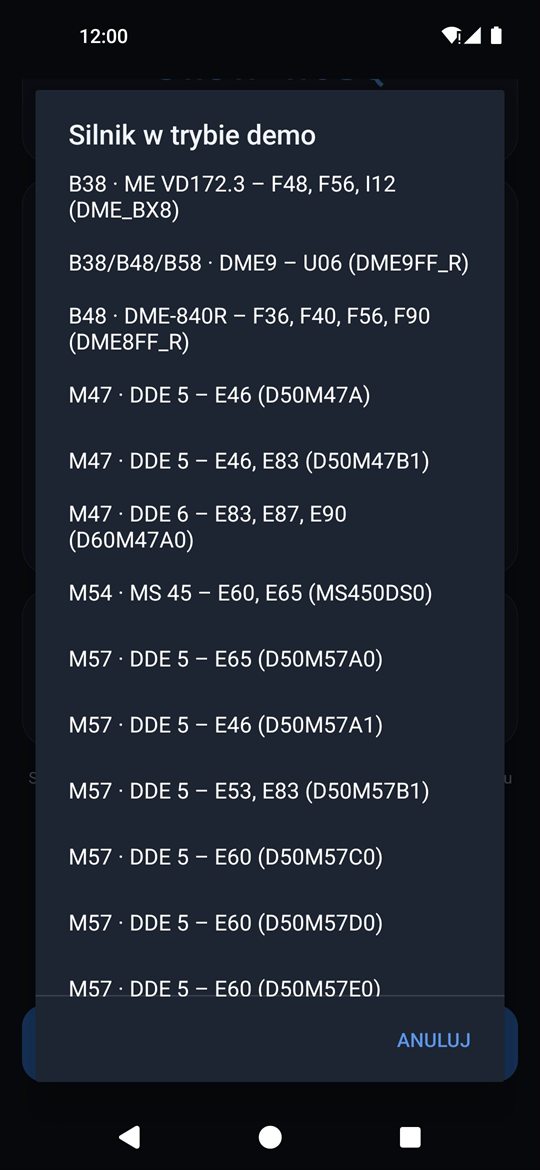
The engine list in SC Diag demo mode (simulated data). The full list of 97 control units is on the supported engines page.
In short: first decide what you want to diagnose, the engine or the whole car, and how deeply. A cheap reader is enough for the code behind a warning light, an app with an ELM327 for general data, an engine-focused program for control unit data, and workshop software for coding and procedures. None of them replaces a specialist's judgement.
Start with the question, not the program
It usually starts with a situation. A warning light is on. The engine judders and there are no fault codes. You are buying a car and want a look under the bonnet without taking it apart. Or you want to change a setting in the car. Each of these needs a different tool, and “better” here always means “better for something”.
A feature-rich tool is not automatically a good choice. For reading a code it is overkill, and a chance of making a mistake. Conversely, the simplest reader can be helpless against a fault that leaves no trace in the fault memory.
Five types of tool
The table below is general. Specific products in each category differ in what they can do, so always check the description of the one you are considering.
| Type of tool | What it usually shows | When it is enough | When it is not enough |
|---|---|---|---|
| Cheap OBD code reader | Generic fault codes and a dozen or so standard values | When you want to know which code is behind a warning light | When the symptom leaves no code, or you need data specific to BMW |
| Universal app with an ELM327 adapter | Generic OBD parameters; the scope depends on the app | A quick check of codes and basic values on cars of various makes | When you need deeper diagnostics of a BMW engine control unit, for example adaptations and counters |
| Brand-oriented app for BMW (in general) | A read-out of selected systems; the scope varies widely between apps, often together with changing some settings | When the aim is a quick read-out and minor settings, and the product covers your model | When you need engine analysis or procedures outside the app's scope (check the description) |
| Workshop and main-dealer software | Many of the car's modules, service procedures, coding and programming | For coding, module replacement and professional work | When you only want to look into the engine: a high entry barrier, the right interface and power supply are needed, and there is a risk of error |
| App focused on the engine (like SC Diag) | Engine control unit values, fault codes with freeze frames, rough run, logs from driving | Engine symptoms, a pre-purchase check, a check after a repair, data for analysis | Coding, body modules and programming; the scope depends on the control unit's data |
Six questions before you choose
- What are you diagnosing, the engine or the whole car? For the engine, a tool focused on the engine control unit is enough. Body modules, coding and programming are already workshop software territory.
- Petrol or diesel? Check whether the tool has screens for your system. A diesel has different systems (EGR, boost, particulate filter, AdBlue) from a petrol engine (mixture, ignition, VANOS).
- How deeply do you want to look? Codes and a dozen or so standard values are one thing. Adaptations, misfire counters and freeze frames are another.
- Do you need an expert's opinion? If you do not want to interpret the data yourself, look for a tool that lets you save a read-out and pass it to a specialist.
- What is the total cost? A time-limited or one-off licence, the adapter, possibly a power supply. Compare the whole, not just the price of the program.
- Do you understand the tool's language? Parameter and fault descriptions in a language you cannot read are as good as no descriptions.
Where SC Diag fits
SC Diag is an app focused on the engine. It runs on Android and Windows and supports 97 BMW and MINI engine control units, petrol and diesel, from the E46 to the G series. It shows live values, fault codes with freeze frames, rough run and logs from driving, and a full read-out can be sent to us for a PDF report. The interface is in Polish, English, German and French.
Its limits are clear. It does not code, it does not cover all body modules and it does not replace main-dealer diagnostics of the whole car. The scope depends on the data the control unit provides, and the N43 and N53 are the most fully developed. A licence costs €9.99 for 30 days, €29.99 for a year or €69.99 for two years with the Service tab, separately for Android and Windows, and before buying you can look at the demo mode. We write more about what to expect from such an app in the text BMW diagnostics with an app on Android and Windows, and about adapters in the article on ELM327, K+DCAN and ENET adapters.
The most common mistakes when choosing
First: buying the cable before the program. The interface is chosen to suit the program and the car's series, not the other way round. Second: comparing tools by the number of parameters in the description. What matters more is whether the parameters of your engine are described at all and whether the tool knows its control unit. Third: expecting coding from a read-out app, or the reverse, reaching for heavy workshop software just to check a code. Fourth: the cheapest adapter from a listing. ELM327 clones can be unstable and drop the connection, and then the car looks like the culprit.
What no program will settle
A fault code points to an area, not to a part to replace. Data without interpretation is just numbers. With recurring faults, inspection, measurements and a check of the mechanics always come into it, and no app will do those for you. How to put read-outs together into one picture is described in our guide to live engine parameters.
Frequently asked questions
For reading a code and basic values, yes. When the symptom leaves no code, or you need the engine control unit's adaptations and counters, it is not enough.
A reader is simple and needs no phone. An app will show more if it knows the protocol of the BMW engine control unit. The choice depends on how deeply you want to look.
Rarely, and usually at the cost of a higher entry barrier or a risk of mistakes. They are two different jobs, often done with different tools.
No. It is engine diagnostics: it does not code, it does not cover all body modules and it does not replace main-dealer procedures.
Look for a list of control units or engines that names the engine (for example N47 or B58), not just the car model. You will find our list on the supported engines page.
Check what SC Diag will show on your engine
The list of 97 control units, the demo mode and the pricing in one place.
See SC Diag