Plenty of people type “BMW diagnostics app” and expect something that will do what the computer at a main dealer does. No such app exists, and wrong expectations end in disappointment or a cable lying in a drawer. We are the authors of SC Diag, so we write from that perspective, but this text describes the whole category: what a good engine app can give you, and where its role ends.
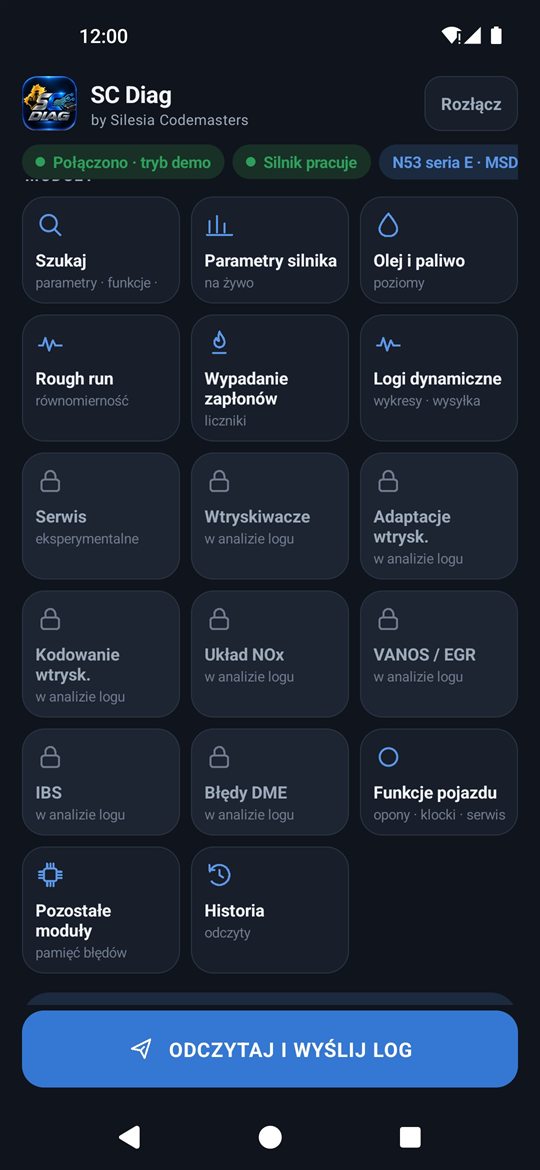
SC Diag modules screen on an Android phone – screenshot from the demo mode (simulated data); the same core runs on a Windows laptop.
In short: an app on a phone or laptop will read the data and fault codes of a BMW engine control unit, show live values and save a log for analysis. It will not replace main-dealer diagnostics of the whole car, nor module coding. You need an adapter suited to the car's series, and the scope of data depends on the control unit and on the program itself.
Three jobs that are easy to confuse
The first is reading the engine: the control unit's fault memory, live values, adaptations, counters. The second is diagnostics of the whole car: body, chassis and comfort modules, plus the manufacturer's service procedures. The third is coding, that is changing function settings in modules. Each needs different software and carries a different risk.
SC Diag belongs to the first group. It also shows the fault memory of the other modules on a map, but it does not code and it is not a substitute for main-dealer procedures. If someone promises a single app for everything, ask what exactly they mean.
What it is reasonable to expect
A good engine app will show values the control unit really provides, not just generic OBD data. Fault codes with a description and a freeze frame, that is the conditions under which the fault was stored. A chart of cylinder running, misfire counters, a log from driving. It should also show honestly what is missing: a value the control unit does not report should not appear.
That is enough for a few concrete jobs: finding out which code is behind a warning light, checking a car before buying it, verifying after a repair or collecting data for a specialist. A read-out narrows down where to look and points to a probable direction. A decision to replace a part has to rest on something more.
What not to expect
- coding and programming of control units: SC Diag has no FDL or NCS coding
- support for every body module
- parameters the control unit does not provide
- a definitive verdict from a single fault code
- a replacement for inspection and measurements in the workshop
The fullest scope of assessments is for the N43 and N53. For the other engines (97 control units in all, petrol and diesel) we show what the control unit provides.
Phone or laptop
The diagnostic core and the list of 97 control units are the same. What differs is the screen and the way you connect. A phone with Android 8.0 or newer works well in the car: a quick read-out, a pre-purchase check, logs from driving. A laptop with Windows 10 or 11 (64-bit) has a big screen, charts and a mouse, so it suits work on the car in a workshop better. The Windows program is described on the SC Diag for Windows page. There is no version for iPhone or Mac computers.
How to connect
For read-outs alone, an ELM327 adapter is usually enough. Older BMWs, the E-series, are best connected with a K+DCAN cable, and newer ones, the F and G series, with an ENET cable. The cheapest ELM327 clones can be unstable, and for procedures that write anything, a cable is safer. Support for the workshop interfaces ICOM, VXDIAG and J2534 is in testing and has no confirmation on a vehicle yet, so do not treat it as ready. A step-by-step description is in the text on ELM327, K+DCAN and ENET adapters.
What the first read-out looks like
You plug the adapter into the OBD socket, switch on the ignition and connect the app to the adapter. The program recognises the engine control unit by itself, and you tell it when the problem occurs: on a cold engine, on a warm one, always, or that it is only a check. Then the engine runs and you do not touch the accelerator until the app finishes measuring. The result stays on the device as read-out history that you can come back to later. The next steps are described in a separate guide to the first read-out in SC Diag.
Licence, demo mode and one-off read-out
Demo mode works after installation without a car and without a licence, on simulated data. A licence is tied to one device, and Android and Windows are separate licences at the same prices: 30 days costs €9.99, a year €29.99, and two years with the Service tab €69.99. Prices are final: we use a VAT exemption. The Service tab contains experimental procedures that you run at your own risk, after a warning and confirmation.
If you would rather not buy a licence, you order a diagnostic from us and get access to a one-off read-out in the Android app free of charge. You send the log to us, and a report with the analysis arrives by e-mail. This is what log analysis looks like. For difficult faults, for example when the engine judders without any fault code, such a report can be a more sensible way out than guessing on your own. The whole scope of the app is on the SC Diag page.
Frequently asked questions
No. An engine read-out points a direction and narrows down the checks, but it does not replace inspection or measurements on the car. For recurring faults and judder without codes, it is better to add a specialist's analysis.
SC Diag is not for coding. It is engine diagnostics, with the fault memory of other modules and the experimental Service procedures in the 2-year licence.
On phones and tablets with Android 8.0 or newer and on laptops with Windows 10 and 11 (64-bit). There is no version for iPhone or Mac.
Yes. Demo mode works without a car and without a licence, but on simulated data, so it is for looking at the screens, not for assessing your own engine.
A read-out, live values and sending a log change nothing in the control unit. Changes are made only by clearing fault codes and by Service procedures, which you start yourself, after confirmation.
Look at the SC Diag demo mode
Check the screens without a car or a licence, choose an engine and see what the app will show.
See SC Diag