The public SC Diag currently reads the fault memory of the electric drive modules, but it does not show battery or drive figures. We are working on that separately, in an internal development version, and on this page we show what its electric car dashboard looks like. Every screenshot comes from demo mode and uses simulated data.
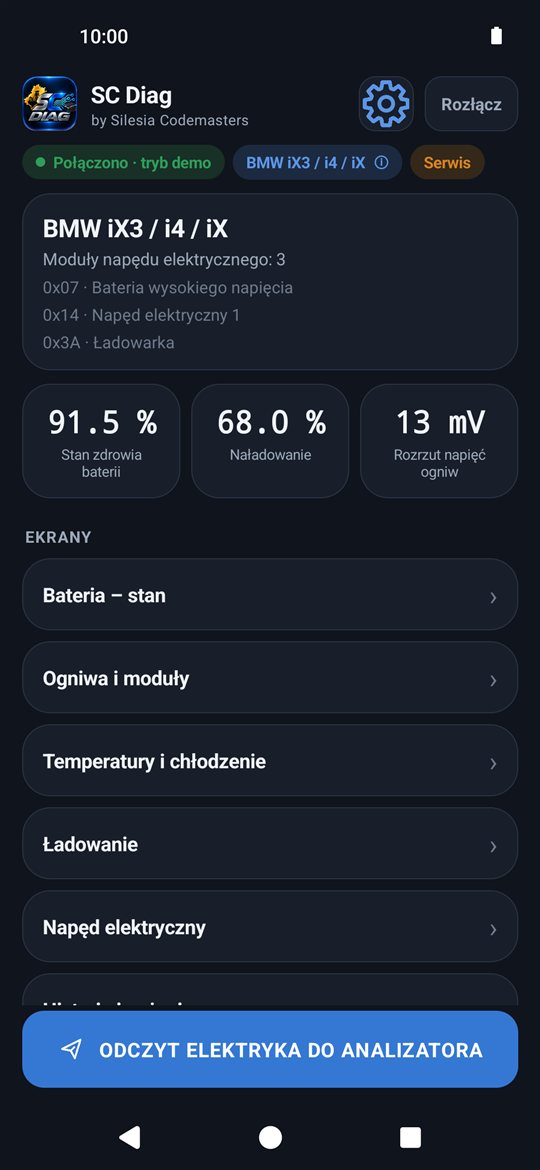
Electric car dashboard. Development version, demo mode, simulated data; not yet available in the public app.
This is not a launch announcement. Moving the dashboard into the public releases is under way, but we give no date and no promise. What already works for customers is described on the page about electric cars and hybrids in SC Diag: fault memory of the electric drive modules, on Android from version 1.0.9 and on Windows from 1.0.33.
The short answer: The electric car dashboard is a development version of SC Diag, shown here only in screenshots from demo mode with simulated data. It has read-only screens for the battery, cells, temperatures, charging, drive and history. It is not in the public app yet; the public app offers the fault memory of the electric drive modules.
What exactly you are looking at
All the screenshots come from the internal development version, in demo mode (the bar at the top says “Połączono · tryb demo”, that is “Connected · demo mode”) and with simulated data. The text in the screenshots is in Polish. In the demo the car is called “BMW iX3 / i4 / iX” as a collective label. It is a label for demonstration data for an electric car with a battery and drive, not a list of models and not a guarantee for specific cars.
The figures in the screenshots are simulated. They show the layout of the screens, not norms, thresholds or an assessment of a real battery.
Dashboard: three tiles and a list of screens
In the development version the top of the dashboard is a car card with the number of electric drive modules. In the demo there are three: the high-voltage battery, the electric drive and the charger. Below the card are three tiles: battery state of health, state of charge and the spread of cell voltages. In the demo you can see, for example, 91.5 %, 68.0 % and 13 mV, but this is a simulation.
Further down is the list of screens. After scrolling, “Historia i zużycie” (history and wear) and “Pamięć błędów wszystkich modułów” (fault memory of all modules) appear, and below the list a “Tylko odczyt” (read only) panel.
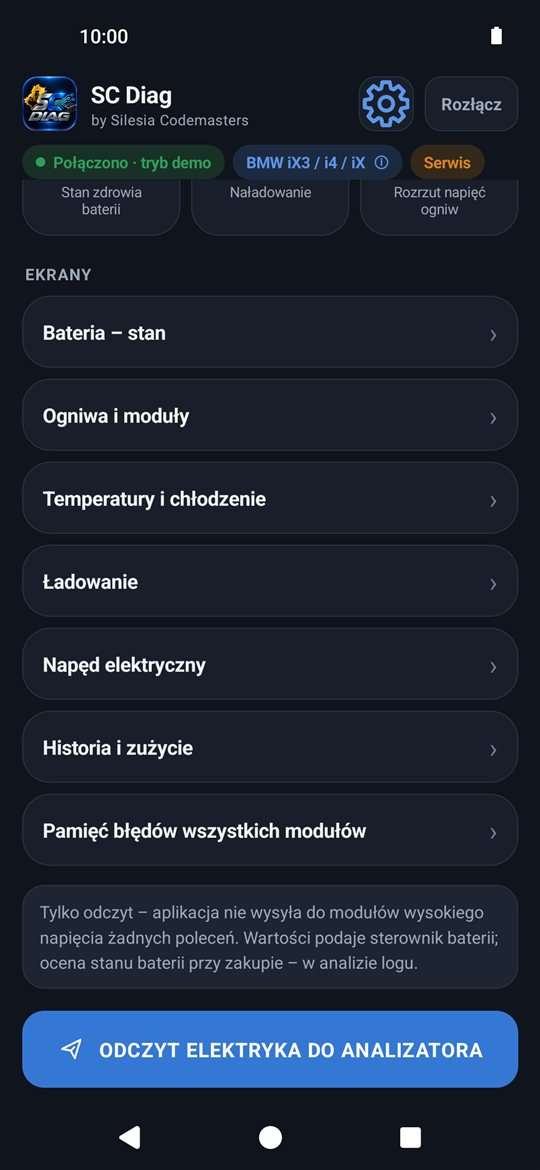
The list of screens and the “Tylko odczyt” (read only) panel. Development version, demo mode, simulated data; not yet available in the public app.
Battery and cells
In the development version the “Bateria – stan” (battery status) screen lists values calculated by the battery control unit itself: state of health (SOH) as capacity relative to a new battery, SOH of the weakest cells, capacity now and reference capacity, state of charge in two forms (the reading from the instruments and the value from the control unit), and battery voltage and current. Under the table there is a short explanation of SOH and of the difference between the two charge values. The 91.5 % SOH in the demo is an example, not a result anyone should expect.
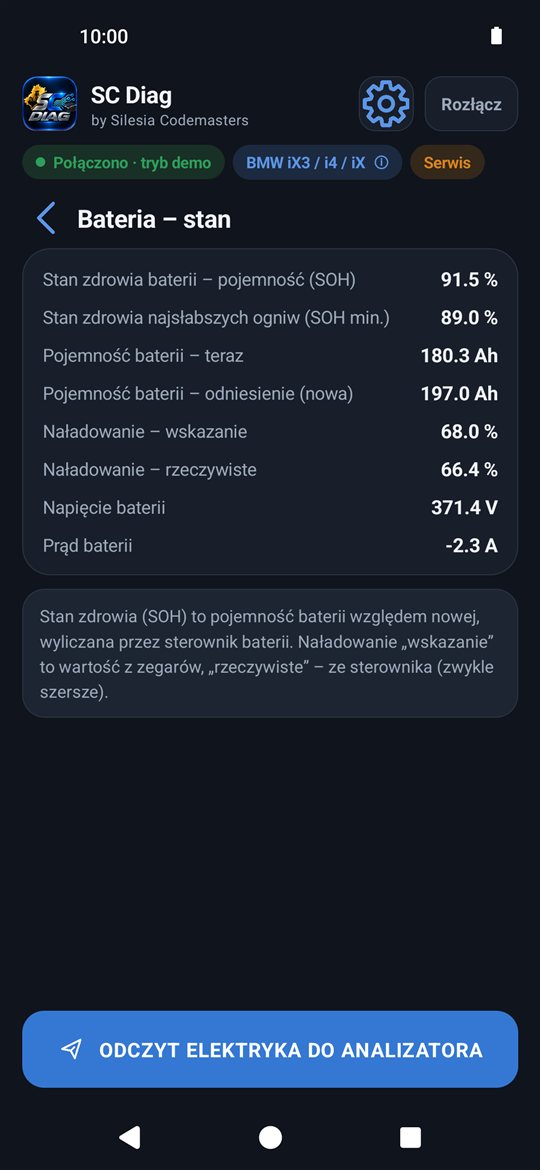
The “Bateria – stan” (battery status) screen. Development version, demo mode, simulated data; not yet available in the public app.
The “Ogniwa i moduły” (cells and modules) screen shows only the extremes: the lowest and highest cell voltage, the SOH of those two cells and the spread, that is the difference between them. Despite the name, it has no list of battery modules or of individual cell voltages. The screen reminds you that the spread is best judged with the battery at rest, because it grows under load.
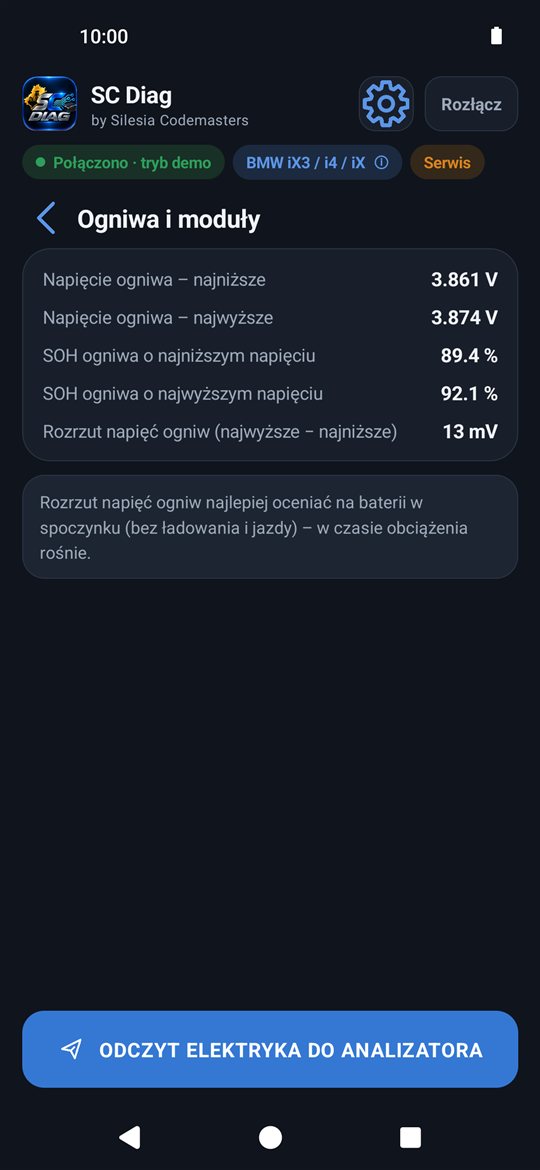
The “Ogniwa i moduły” (cells and modules) screen. Development version, demo mode, simulated data; not yet available in the public app.
Temperatures and charging
In the demo, “Temperatury i chłodzenie” (temperatures and cooling) gives the cell temperature (lowest, average, highest), the battery coolant, the electric motor (stator) and the inverter. A note points out that the cell temperatures are calculated by a model in the battery control unit.
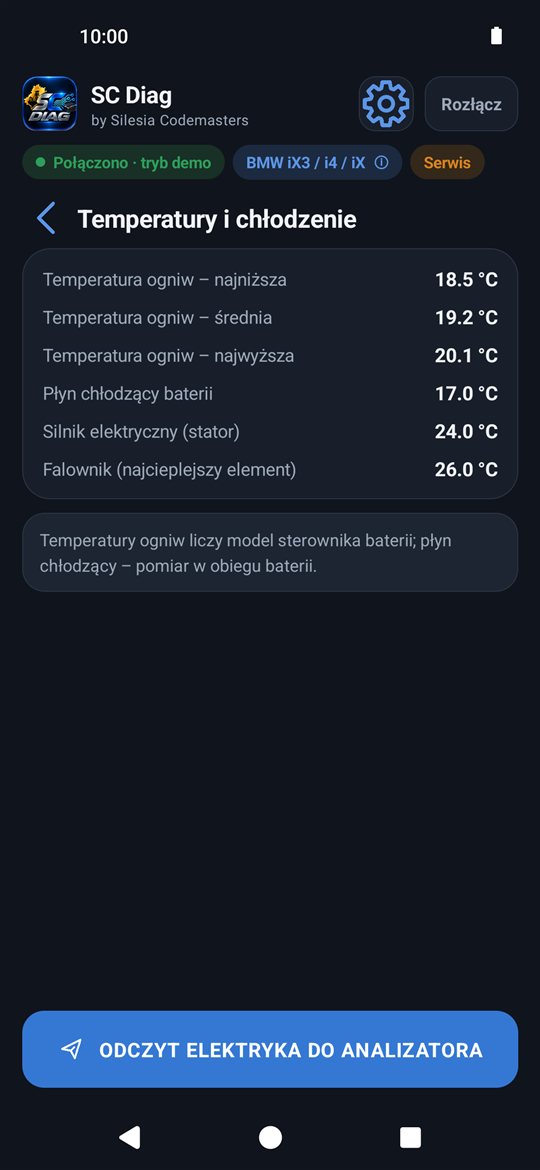
The “Temperatury i chłodzenie” (temperatures and cooling) screen. Development version, demo mode, simulated data; not yet available in the public app.
In the development version the “Ładowanie” (charging) screen shows a charge counter, full charges, the highest recorded charging current and the last four charges: state of charge at the start and at the end, and the energy. The records are kept by the battery control unit; an empty field means there is no record.
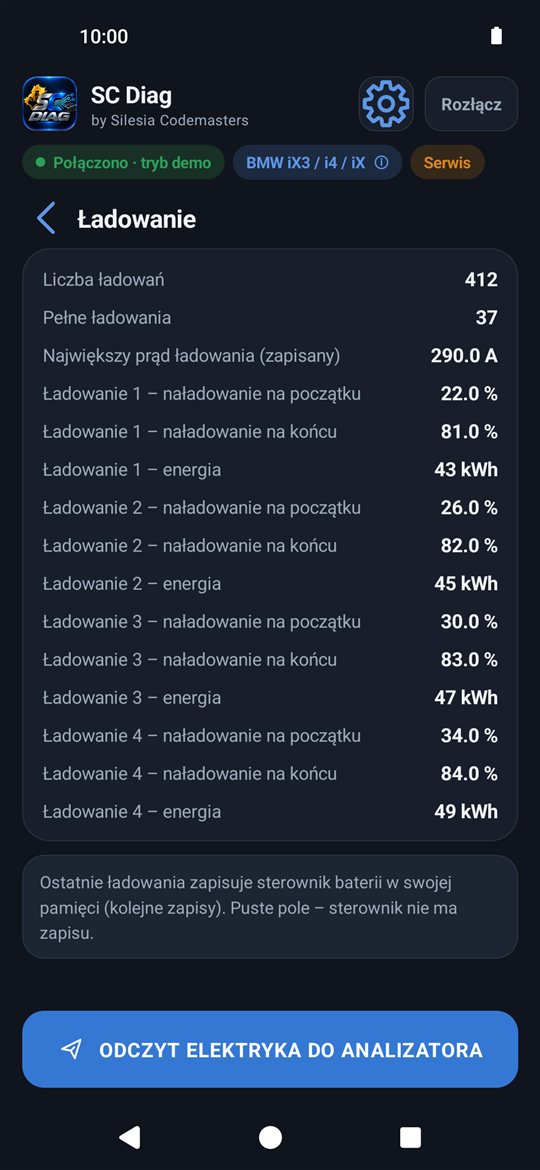
The “Ładowanie” (charging) screen. Development version, demo mode, simulated data; not yet available in the public app.
Drive and history
The “Napęd elektryczny” (electric drive) screen of the development version shows speed, torque, inverter DC current, rotor brush wear and rotor excitation current. In the demo the car is stationary, so speed, torque and the currents are zero. A note says that brush wear is reported only by motors with a wound rotor.
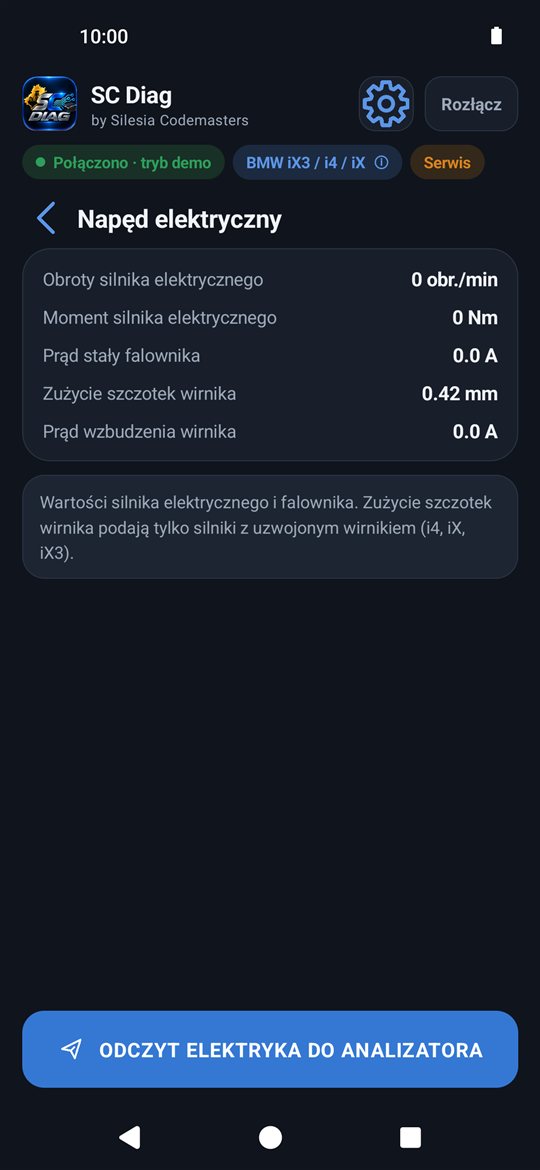
The “Napęd elektryczny” (electric drive) screen with the car stationary. Development version, demo mode, simulated data; not yet available in the public app.
In the development version, “Historia i zużycie” (history and wear) shows the battery control unit’s counters since new: energy flowing through the battery, energy from mains charging and from regeneration when braking with the motor, and the charge from DC fast charging in three charge ranges. The screen notes that the counters are not cleared together with the fault memory.
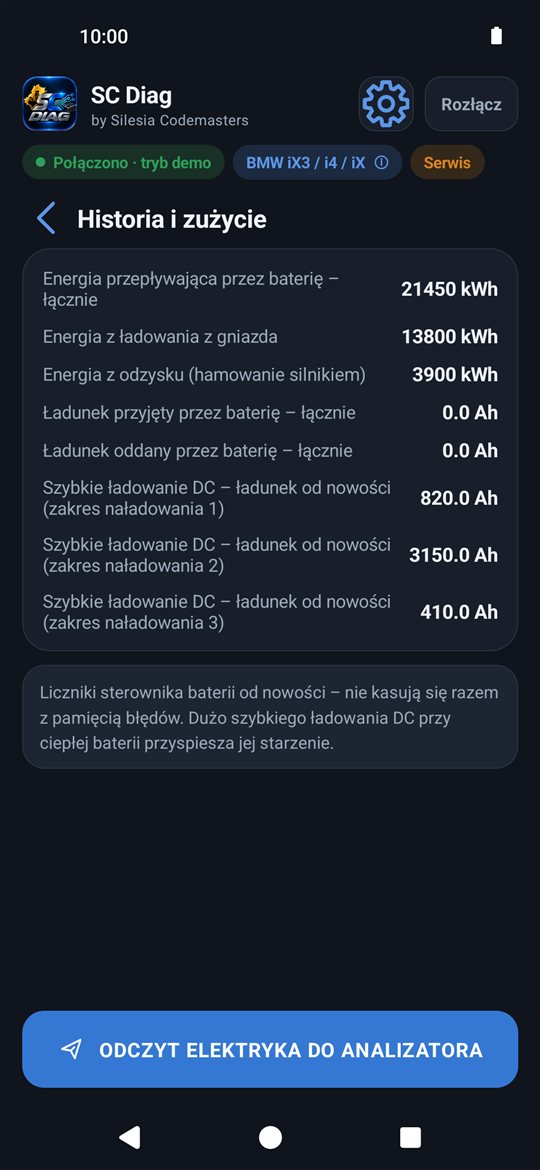
The “Historia i zużycie” (history and wear) screen. Development version, demo mode, simulated data; not yet available in the public app.
Read only, and the button to the analyser
The panel below the list of screens says it plainly: the app sends no commands to the high-voltage modules, and the values are supplied by the battery control unit. The dashboard shows what the control unit has recorded.
The same panel adds that assessing the state of a battery, for example when buying a car, belongs to log analysis and not to the phone screen. That is why every screen ends with the button “Odczyt elektryka do analizatora” (electric car reading to the analyser). This is not yet a service we offer. How to record a combustion engine log today and send it to us is described in the text on recording a log.
What this dashboard is not
- It is not available in the public app. Releases 1.0.9 (Android) and 1.0.33 (Windows) have only the fault memory of the electric drive modules.
- It is not an assessment of a battery. The figures are simulated, and we give no norms or thresholds.
- It does not replace a workshop. Values from the control unit are material for a conversation, not a diagnosis.
- It has no list of supported models, because the scope depends on the car.
Safety around the high-voltage system
Only suitably qualified people may work on the high-voltage system. SC Diag only reads and does not require you to touch the high-voltage installation: you plug the adapter into the diagnostic socket. If a high-voltage warning light or a “stop” message appears on the dashboard, do not keep driving and contact a workshop. More on that situation in the text about a high-voltage battery fault.
How we can help
There are two routes. The first is the public SC Diag, which already reads the fault memory of the electric drive modules today and, in hybrids, the combustion engine too (plug-in hybrid in one reading). A 30-day licence costs €9.99, a yearly one €29.99 and a two-year one with the Service option €69.99, separately for Android and for Windows (order). Changes between releases are described in the change history.
The second route is the combustion engine, also in a hybrid: we carry out engine diagnostics ourselves and agree the scope by phone before the visit (N53 diagnostics). Work on the high-voltage battery is not covered on this page.
Frequently asked questions
No. It is a development version, shown here in screenshots from demo mode with simulated data. The public releases have the fault memory of the electric drive modules, but not the dashboard with figures.
No. The panel on the dashboard screen says that no commands reach the high-voltage modules and that the values are supplied by the battery control unit. This is reading, not coding or servicing.
No. Values from the control unit help you prepare a conversation with a workshop, but they are neither a diagnosis nor an inspection.
We do not promise that. “BMW iX3 / i4 / iX” in the screenshots is a collective label for demonstration data, and the scope depends on the car, the model year and the adapter.
We give no date and do not promise that it will appear. The current state of the releases is in the app’s change history.
An electric or hybrid BMW to read for faults?
The public SC Diag reads the fault memory of the electric drive modules. The dashboard on this page is a development version in demo mode.
What SC Diag reads in electric cars today