A fault code says something is wrong, but it rarely says when or why. The engine stumbles when cold and stops once warm, and the fault memory is empty or unclear. That is when a log helps: a record of what the control unit reported during the read-out. We show how to make one in SC Diag, what is in it, how it is protected and what you get after sending it for analysis.
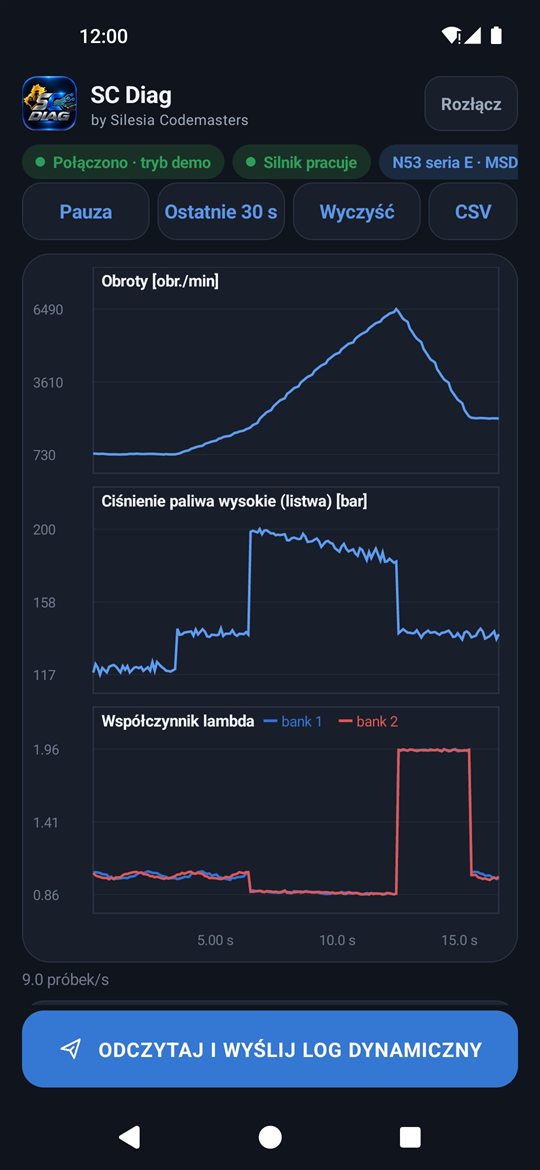
Dynamic logs in SC Diag: a screenshot from demonstration mode (simulated data).
In short: a log is a record of an engine read-out, encrypted in the app, which you send to us only if you decide to. Say in the app when the symptom occurs, do a read-out at standstill and, for symptoms that appear on the move, possibly a dynamic log. In return you receive a PDF report that points to a probable direction but does not replace an inspection in a workshop.
Why a log, when there is already a fault code
A single code is one piece of information without context. A log gathers many control unit values at once, so you can see relationships: whether the deviation concerns one cylinder, only a cold engine or only load. In SC Diag this is called a read-out for analysis: the same read-out you do yourself is saved as an encrypted log, and you decide whether to send it. The scope depends on the engine and control unit. On the N43 and N53 that is more than 200 values in one log, and on other engines as many as the control unit supplies.
Before you start: describe the symptom in your own words
The app starts with the question “When does the problem occur?”. You can answer: on a cold engine, on a warm engine, always or hard to say, or choose “no symptoms, just a check”. That decides how the app guides the read-out and what goes into the log, so answer honestly even if you are not sure.
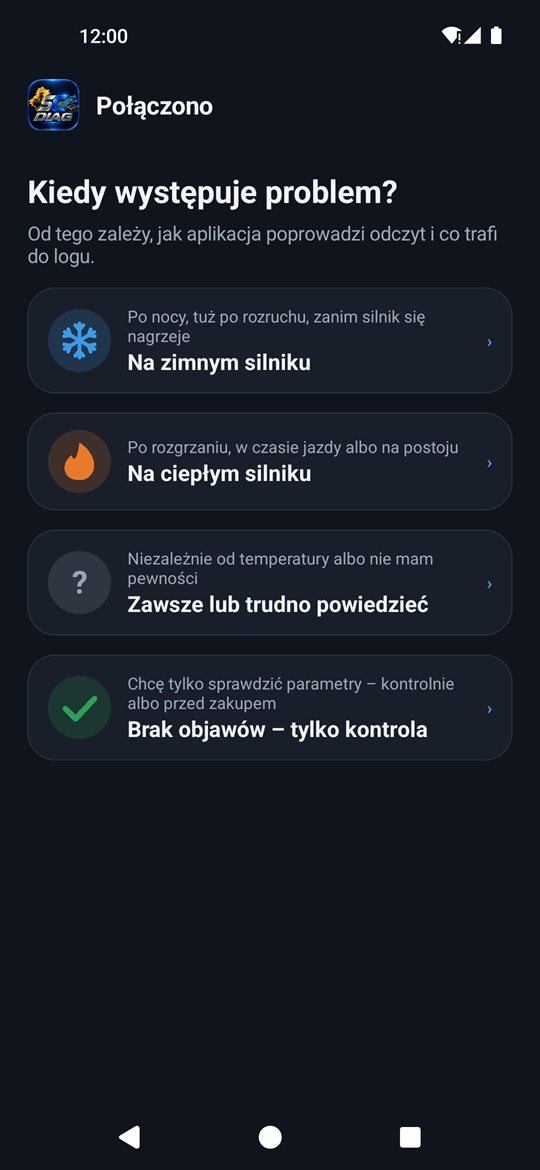
The answer to this question decides how the app guides the read-out (demonstration mode, simulated data).
Before you touch the phone, note down when it happens (after a night, once warm, always), during what action (idling, pulling away, accelerating), whether a warning light is on and what was replaced recently. Enter this in the description field when you order the analysis. The field is optional, but it helps. Do not guess the cause; describe what you feel and see.
A read-out at standstill
The simplest log is made on a stationary car in SC Diag. Connect the adapter, connect the app, choose the symptom and follow the prompts. During a full read-out the app checks that the engine is running and asks you not to touch the accelerator. For a cold-engine symptom, do the read-out before the first start of the day and do not start the engine earlier without need. We covered it step by step in the guide to the first read-out.
A licence is not a condition here: a read-out for analysis can be done without a key. The key is only needed for the live view of values. If the analysis needs an additional read-out, for example on a cold engine, we will write to you.
Dynamic logs from driving: when to be careful
Some symptoms do not show at standstill because they appear only under load. A dynamic log serves that purpose: a recording from driving with live charts (for example fuel pressure, boost, lambda), which you can also send for analysis. The screen in the app describes such a measurement as acceleration under heavy load in a higher gear.
This is not done on an ordinary road in a way that breaks the rules, nor anywhere someone could be hurt. The driver drives and does not operate the phone; starting and saving should be handled by a second person, and the measurement is made only where it is legal and safe. If you do not have such conditions, do a read-out at standstill and tell us that the symptom appears when driving. We will decide what to do next.
What is in the log and who reads it
According to the Privacy Policy, the log contains technical data: the device code, licence type and number, app version, the date and time from the device, identification of the engine control unit and the read-out results. If you enter them in the app, vehicle and customer details are added (for example registration number, VIN, mileage, model, contact details, description of the problem). Entering them is voluntary, but without them the report may be less accurate.
The log is encrypted in the app and read only by us. The policy does, however, note an exception: vehicle and customer details entered in the read-out form may be visible in plain text in the e-mail that carries the log and, in the Windows program, also in the log file header. If you do not want something to end up there, do not enter it. Retention periods are set out in section 4 of the Privacy Policy. We do not copy them here, so that they cannot drift from the document. Your read-out history is stored on your device and you can delete it.
Sending it, and what you get back
You order the analysis from the app, and the log arrives together with the order. Without the app you place the order on the website and send the log, entering the order number in the subject. The PDF report arrives by e-mail after the payment has been received and the log delivered, usually within 1 working day.
- Basic Diagnostics, €50: analysis of faults and engine operating parameters, a service report and recommendations for further diagnostics and repair.
- Premium Advanced Diagnostics, €65: detailed analysis of control unit parameters and adaptations, an extended report, identification of the most probable cause and one free check after the repair within 30 days of the report.
- Premium with dynamic logs, €80: analysis of static and dynamic parameters, logs recorded while driving, an extended report and one free check after the repair.
What the report does not replace
The report rests on what the control unit supplied. It will not see a leak, mechanical wear or play, and it does not cover modules the log does not concern. The results are auxiliary, and a specialist’s assessment decides on the repair. If the car behaves dangerously, goes into limp mode, makes noise or leaks, do not wait for the report; take it to a workshop straight away.
Frequently asked questions
Yes. You can do a read-out for analysis on a cold or warm engine without a key, send the log and receive the PDF report. The live view of values needs a licence.
No. Vehicle and customer details in the app are voluntary. Without them the report may be less accurate, and some of them may be visible in plain text in the message with the log, as we describe above.
The log is encrypted in the app, and you decide whether to send it. The exceptions and retention periods are described in the Privacy Policy.
Usually within 1 working day of the payment being received and the log delivered. If the analysis needs an additional read-out, we will write to you.
No. The report points to a probable direction and narrows down what to check, but it does not replace an inspection, measurements on the car or an assessment of mechanical condition.
Order a log analysis
Send the log from SC Diag and receive a PDF report by e-mail, usually within 1 working day of the payment being received and the log delivered.
Order the analysis